GERY SCHEDULING FORM Place Patient Label Above This Line 6660 6660 N 6/28/12 .
Loading

Open form follow the instructions

Easily sign the form with your finger

Send filled & signed form or save
How to fill out the Saint Mary's Hospital Urological Surgery Scheduling Form online
Filling out the Saint Mary's Hospital Urological Surgery Scheduling Form can seem daunting, but with the right guidance, it becomes a straightforward process. This guide will provide you with clear, step-by-step instructions to help you complete the form accurately and efficiently.
Follow the steps to complete the form seamlessly.
- Click ‘Get Form’ button to obtain the form and open it in the online editor.
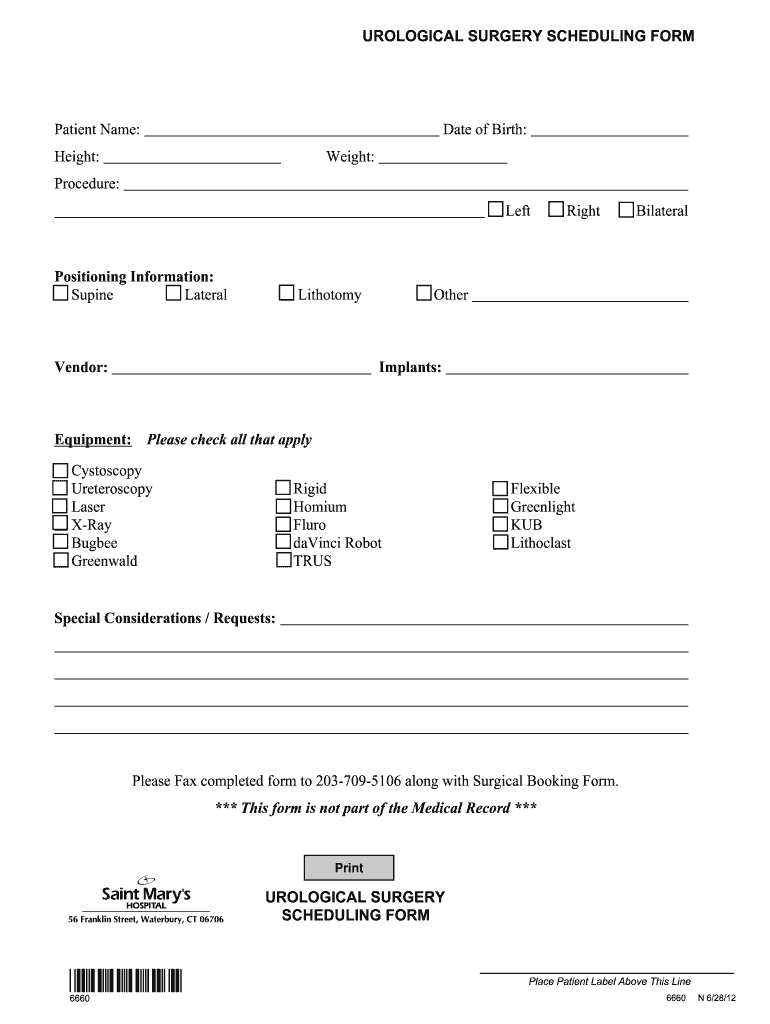
- Enter the patient's full name in the designated field to ensure proper identification.
- Input the patient's date of birth in the required format to verify age and eligibility.
- Provide the patient's height and weight, as this information is crucial for surgery planning.
- Select the procedure being performed by checking the appropriate box: Left, Right, Bilateral, or Other.
- Indicate the positioning information by choosing one of the provided options: Supine, Lateral, or Lithotomy.
- List the vendor and any equipment that will be used during the procedure in the specified fields.
- Check all applicable options under implants, including Cystoscopy, Ureteroscopy, Laser, and others as listed.
- Include any special considerations or requests to accommodate the patient’s needs during the procedure.
- After completing the form, ensure all entries are accurate and then save your changes.
- Download or print the completed form for your records, and remember to fax the completed form along with the Surgical Booking Form to the provided number.
Complete the Saint Mary's Hospital Urological Surgery Scheduling Form online today for a smoother scheduling experience.
Experience a faster way to fill out and sign forms on the web. Access the most extensive library of templates available.
Related content
Apr 12, 2018 — The services currently offered by St. Joseph's Hospital. Health Center...
All provide clinical services at SSM Health Saint Louis University Hospital, SSM Health...
Aug 2, 2021 — The optimal age for the three-dose schedule of the nonavalent HPV vaccine...
Use professional pre-built templates to fill in and sign documents online faster. Get access to thousands of forms.
If you believe that this page should be taken down, please follow our DMCA take down process here.