Loading
Get Misdemeanor Management Services Franklin Tn
How it works
-

Open form follow the instructions
-

Easily sign the form with your finger
-

Send filled & signed form or save
How to fill out the Misdemeanor Management Services Franklin Tn online
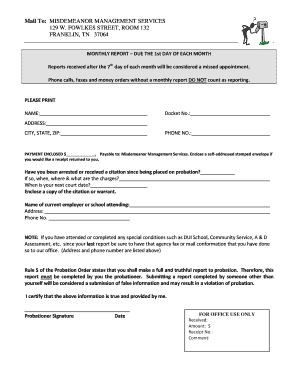
This guide provides users with a detailed, step-by-step approach to completing the Misdemeanor Management Services Franklin Tn form online. It aims to simplify the process and ensure that all necessary information is accurately reported to comply with probation requirements.
Follow the steps to successfully complete the Misdemeanor Management Services form online.
- Press the ‘Get Form’ button to access the Misdemeanor Management Services form, ensuring you have the document open for editing.
- Fill in your full name in the designated field labeled ‘NAME’. This identification is crucial for your report.
- Enter your docket number in the ‘Docket No.’ section. This number is unique to your case and helps in tracking your report.
- Provide your complete address, including city, state, and ZIP code, in the corresponding fields.
- Record your phone number in the section labeled ‘PHONE NO.’. Ensure it is a number where you can be reached.
- Input the payment amount you are enclosing in the ‘PAYMENT ENCLOSED $’ field. Remember to make it payable to Misdemeanor Management Services.
- Indicate if you would like a receipt returned by enclosing a self-addressed stamped envelope.
- Answer the question regarding any arrests or citations received since your last report. Clearly provide the relevant details: when, where, and what the charges were.
- Note down your next court date in the appropriate section to keep the office informed of your status.
- Attach a copy of any citations or warrants related to your case as specified.
- Fill out the section regarding your current employer or school attended, including their address and phone number.
- If you have completed any special conditions since your last report, confirm that relevant agencies have sent documentation to the office.
- Sign and date the form in the section labeled ‘Probationer Signature’ to certify the truthfulness of the information provided.
- Save your changes, then you may download, print, or share the completed form as needed.
Take the next step in your probation management by completing the Misdemeanor Management Services form online today.