Loading
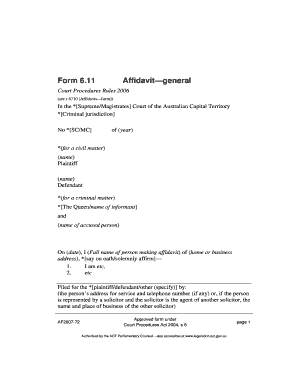
Get Form 6 11 Affidavit
How it works
-

Open form follow the instructions
-

Easily sign the form with your finger
-

Send filled & signed form or save
How to fill out the Form 6 11 Affidavit online
Filling out the Form 6 11 Affidavit online is a straightforward process that requires attention to detail. This guide will provide clear instructions to help you complete the form accurately and efficiently.
Follow the steps to complete the affidavit correctly.
- Click 'Get Form' button to obtain the form and access it within the editor.
- Begin by identifying the relevant court jurisdiction at the top of the form, selecting either the Supreme or Magistrates Court of the Australian Capital Territory depending on your case type.
- Indicate the nature of the case: civil or criminal. For civil matters, provide the names of the plaintiff and defendant in the designated fields.
- For criminal matters, specify the name of the informant or The Queen, along with the name of the accused person.
- Enter the date on which the affidavit is being completed and ensure to provide your full name along with your home or business address.
- You will need to include a statement of oath or affirmation at this point, indicating whether you 'swear' or 'solemnly affirm'.
- In the following sections, provide the content of your affidavit, starting with 'I am...' and continuing with the relevant information as needed.
- When completed, include your details as the individual filing the affidavit, including your address for service and a contact number, if applicable. If you are represented by a solicitor, provide their information.
- At the end of the affidavit, ensure you sign and date the document in the presence of a qualified individual, like a Justice of the Peace or a solicitor.
- If your affidavit extends beyond one page, sign or initial each additional page to ensure completeness and validity.
- Finally, save your changes, and download or print the form for your records or to submit as required.
Start completing your documents online today for a hassle-free experience.