Loading
Form preview
  • US Legal Forms
  • Other Templates
  • Industry Forms
  • Industry Insurance & Medical Forms
  • Metlife Fm5422bet05123de

Get Metlife Fm5422bet05123de

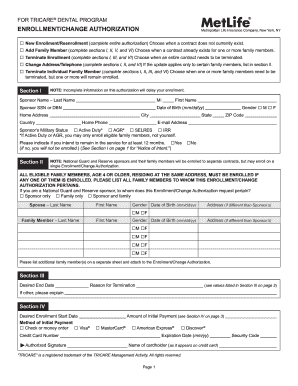
Tract does not currently exist. □ Add Family Member (complete sections I, II, V, and VI) Choose when a contract already exists for one or more family members. □ Terminate Enrollment (complete sections I, III, and VI) Choose when an entire contract needs to be terminated. □ Change Address/Telephone (complete sections I, II, and VI) If the update applies only to certain family members, list in section II. □ Terminate Individual Family Member (complete sections I, II, III, and VI) Choos.

How it works

  1. Open form

    Open form follow the instructions

  2. Easily sign form

    Easily sign the form with your finger

  3. Share form

    Send filled & signed form or save

How to fill out the MetLife FM5422BET05123DE online

Completing the MetLife FM5422BET05123DE form is essential for users interested in the TRICARE Dental Program. This guide provides step-by-step instructions to ensure a seamless online submission process.

Follow the steps to fill out the MetLife FM5422BET05123DE form with ease.

  1. Click ‘Get Form’ button to access the MetLife FM5422BET05123DE form and open it in the editing interface.
  2. Begin by selecting the appropriate option for your enrollment status: 'New Enrollment/Reenrollment', 'Add Family Member', 'Terminate Enrollment', 'Change Address/Telephone', or 'Terminate Individual Family Member'. Complete the relevant sections according to your choice.
  3. In Section I, enter the sponsor's information, including last name, middle initial, Social Security Number (SSN) or Department of Defense Benefits Number (DBN), date of birth, home address, email address, and military status.
  4. Indicate in Section II whether the enrollment pertains to the sponsor only, family only, or both. Provide information for all eligible family members residing at the same address, ensuring that each member who qualifies is listed.
  5. If terminating enrollment, specify the desired end date and the reason for termination in Section III, using the provided values as a guide.
  6. In Section IV, complete the payment information, including your method of payment and credit card details if applicable. Ensure that you sign where indicated.
  7. If applicable, complete Section V to provide information on any other dental insurance coverage held by family members.
  8. Finally, review all entered information for accuracy. Sign the form in Section VI, and proceed to save changes, download, and/or print the form as necessary before submission.

Complete your MetLife FM5422BET05123DE document online for a streamlined enrollment process.

Get form

Experience a faster way to fill out and sign forms on the web. Access the most extensive library of templates available.
Get form

Related content

FOR TRICARE DENTAL PROGRAM - Ohio National Guard
Send Enrollment/Change Authorization with payments to: MetLife, P.O. Box 14185, Lexington...
Learn more

Related links form

Change Of Address (360kb Pdf) - Rochdale Borough Council 2020 Ph Form Fao Princeton High School Code Of Conduct Form 2020 Oregon Child Support Reliacard 2020

Questions & Answers

Get answers to your most pressing questions about US Legal Forms API.

Contact support

MetLife life insurance has undergone significant changes in recent years as part of their strategic repositioning. While new life insurance products are no longer available for sale, existing policies continue to be serviced under the MetLife FM5422BET05123DE umbrella. To find support or alternative solutions, platforms like USLegalForms can help navigate the current offerings and ensure you receive the coverage you need.

Receiving a $50 check from MetLife may be a result of policy adjustments or a refund related to the MetLife FM5422BET05123DE account. This could indicate a surplus in your policy's account value or a promotional adjustment from MetLife. It's essential to review your policy details or contact MetLife customer support for specific clarifications to fully understand the reason behind this check.

MetLife's decision to halt the sale of new life insurance policies stems from a strategic shift towards enhancing its digital assets and technology-focused services. This allows them to streamline operations and focus on providing higher-value products and services without compromising existing commitments. The MetLife FM5422BET05123DE policy still provides ongoing benefits to existing policyholders, ensuring continued support.

Currently, MetLife insurance encompasses a range of financial protection services. The branding has evolved to focus on MetLife financial protection, emphasizing comprehensive coverage that meets diverse customer needs. Under the MetLife FM5422BET05123DE policy, you can explore various options tailored to life insurance and beyond, ensuring maximum benefits.

MetLife life insurance is now known under the term MetLife financial protection solutions. The recent adjustments in branding reflect the company's commitment to broadening its product offerings, which include various life insurance options, retirement solutions, and investment products under the MetLife FM5422BET05123DE policy. This transition aims to provide clearer understanding and support to policyholders.

A MetLife ID number serves as your unique identifier for accessing various MetLife services, including those associated with the MetLife FM5422BET05123DE policy. This number streamlines your interactions with MetLife, whether you are filing a claim or reviewing your policy details. Keeping your MetLife ID number secure is essential, as it protects your personal insurance information.

To fill out a life insurance claim, start by obtaining the claim form from your insurance provider, which may also be available online. Carefully provide all required information, including the insured’s details and relevant documentation such as a death certificate. If you have questions while filling out the claim for MetLife FM5422BET05123DE, US Legal Forms offers valuable tools and documents to streamline the process, making it easier for you to get the support you need.

Filling out a life insurance claim form can be straightforward if you gather all necessary information first. You will typically need to provide details about the policyholder, the insured, and the circumstances of the claim. For assistance with specific claims related to MetLife FM5422BET05123DE, consider using US Legal Forms, where you can find templates and guidance to ensure your form is accurately completed.

You can locate your MetLife policy number on your insurance documents, such as the policy declaration page or your premium notices. Additionally, you might find it in your account online if you have registered on the MetLife website. If you need further assistance, the US Legal Forms platform offers resources that can guide you through the process of accessing your MetLife FM5422BET05123DE policy details.

To obtain reimbursement from MetLife FM5422BET05123DE, you must first file a claim and receive approval. After your claim is approved, you'll receive instructions on how reimbursement will be processed. You can typically expect the reimbursement via direct deposit or check, based on your preferences recorded with MetLife. Make sure your contact information is up-to-date to avoid delays.

Get This Form Now!

Use professional pre-built templates to fill in and sign documents online faster. Get access to thousands of forms.
Get form
If you believe that this page should be taken down, please follow our DMCA take down processhere.
Get MetLife FM5422BET05123DE
Get form
  • Adoption
  • Bankruptcy
  • Contractors
  • Divorce
  • Home Sales
  • Employment
  • Identity Theft
  • Incorporation
  • Landlord Tenant
  • Living Trust
  • Name Change
  • Personal Planning
  • Small Business
  • Wills & Estates
  • Packages A-Z
  • Affidavits
  • Bankruptcy
  • Bill of Sale
  • Corporate - LLC
  • Divorce
  • Employment
  • Identity Theft
  • Internet Technology
  • Landlord Tenant
  • Living Wills
  • Name Change
  • Power of Attorney
  • Real Estate
  • Small Estates
  • Wills
  • All Forms
  • Forms A-Z
  • Other Templates
  • Legal Hub
  • About Us
  • Help Portal
  • Legal Resources
  • Blog
  • Affiliates
  • Contact Us
  • Delete My Account
  • Site Map
  • Industries
  • Forms in Spanish
  • Localized Forms
  • State-specific Forms
  • Forms Kit
  • Real Estate Handbook
  • All Guides
  • Notarize
  • Incorporation services
  • For Consumers
  • For Small Business
  • For Attorneys
  • USLegal
  • FormsPass
  • pdfFiller
  • signNow
  • altaFlow
  • DocHub
  • Instapage
Form Packages
  • Adoption
  • Bankruptcy
  • Contractors
  • Divorce
  • Home Sales
  • Employment
  • Identity Theft
  • Incorporation
  • Landlord Tenant
  • Living Trust
  • Name Change
  • Personal Planning
  • Small Business
  • Wills & Estates
  • Packages A-Z
Form Categories
  • Affidavits
  • Bankruptcy
  • Bill of Sale
  • Corporate - LLC
  • Divorce
  • Employment
  • Identity Theft
  • Internet Technology
  • Landlord Tenant
  • Living Wills
  • Name Change
  • Power of Attorney
  • Real Estate
  • Small Estates
  • Wills
  • All Forms
  • Forms A-Z
  • Other Templates
Customer Service
  • Legal Hub
  • About Us
  • Help Portal
  • Legal Resources
  • Blog
  • Affiliates
  • Contact Us
  • Delete My Account
  • Site Map
  • Industries
  • Forms in Spanish
  • Localized Forms
  • State-specific Forms
  • Forms Kit
Legal Guides
  • Real Estate Handbook
  • All Guides
Prepared for you
  • Notarize
  • Incorporation services
Our Customers
  • For Consumers
  • For Small Business
  • For Attorneys
Our Sites
  • USLegal
  • FormsPass
  • pdfFiller
  • signNow
  • altaFlow
  • DocHub
  • Instapage
Social Media
Call us now toll free:
+1 833 426 79 33
As seen in:
© Copyright 1999-2026 airSlate Legal Forms, Inc. 17 Station Street, Ste. 203, Brookline, MA 02445
  • Your Privacy Choices
  • Terms of Service
  • Privacy Notice
  • Content Takedown Policy
  • Bug Bounty Program