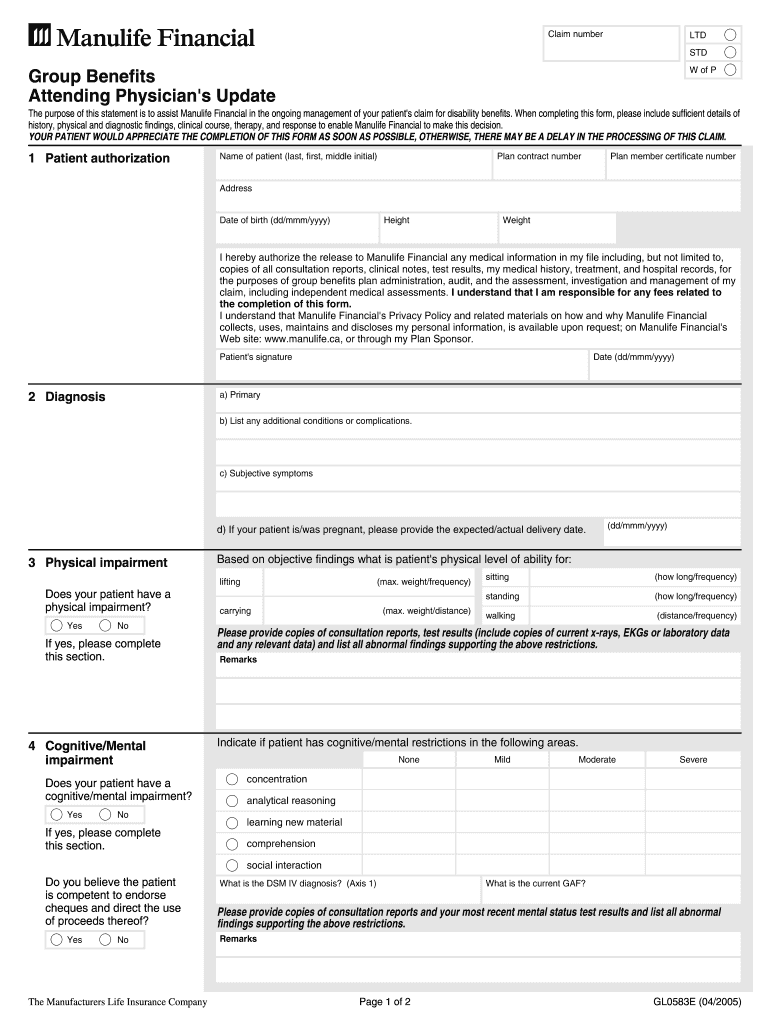
N OF THIS FORM AS SOON AS POSSIBLE, OTHERWISE, THERE MAY BE A DELAY IN THE PROCESSING OF THIS CLAIM. 1 Patient authorization Name of patient (last, first, middle initial) Plan contract number Plan member certificate number Address Date of birth (dd/mmm/yyyy) Height Weight I hereby authorize the release to Manulife Financial any medical information in my file including, but not limited to, copies of all consultation reports, clinical notes, test results, my medical history, treatment, an.
Loading

Open form follow the instructions

Easily sign the form with your finger

Send filled & signed form or save
How to fill out the Manulife GL0583E online
Filling out the Manulife GL0583E form online can seem daunting, but this guide will simplify the process for you. By following these steps, you will provide the necessary information required for disability benefits claims efficiently.
Follow the steps to complete the form accurately.
- To start, locate and press the ‘Get Form’ button to access the Manulife GL0583E form in your preferred editor.
- Begin by entering the patient's information in the 'Patient authorization' section. Provide the patient's name, plan contract number, plan member certificate number, address, date of birth, height, and weight. Ensure that all details are accurate for proper processing.
- In the 'Diagnosis' section, describe the primary condition as well as any additional conditions or complications the patient may have. Include subjective symptoms and, if applicable, details regarding any pregnancy.
- Move to the 'Physical impairment' section. Indicate if the patient has a physical impairment, and if so, fill out the relevant fields regarding their lifting, carrying, sitting, standing, and walking abilities.
- Next, complete the 'Cognitive/Mental impairment' section. Indicate if the patient experiences any cognitive or mental impairments, and detail the areas of impact, such as concentration and comprehension.
- Proceed to fill in the 'Cardiac' section if applicable, noting the patient's functional capacity and blood pressure readings from their last three visits.
- If the patient has any visual impairments, complete that section by indicating their last vision assessment, specifying any treatment plans if vision restoration is possible.
- In the 'Treatment update' section, provide details about the frequency of visits to physicians, nature of treatments received, and any hospital admissions. Include dates and details of treatment plans.
- Complete the 'Physician's authorization' section by providing your information as the attending physician, including your name, specialty, address, contact information, and signature.
- Finally, review all fields for completeness and accuracy. Once satisfied, you can save changes, download, print, or share the completed form as needed.
Complete your Manulife GL0583E form online today to ensure timely processing of your disability claim.
Experience a faster way to fill out and sign forms on the web. Access the most extensive library of templates available.
Get answers to your most pressing questions about US Legal Forms API.
Where can I find my Manulife policy number?
You can locate your Manulife policy number for the GL0583E coverage in several places. Check your policy documents, insurance card, or the online portal after logging in. If you need further assistance, do not hesitate to reach out to Manulife's customer support team.
How to claim Manulife insurance online?
Claiming your Manulife insurance online for the GL0583E policy is a straightforward process. Simply log into your account, access the claims section, and follow the provided instructions to submit your claim. This user-friendly method helps ensure that your claims are handled efficiently.
How do you find your Manulife policy number?
You can find your Manulife policy number for your GL0583E coverage on your policy documents or insurance card. Additionally, log into your Manulife account, where your policy details are available along with your number. If you still cannot find it, contact Manulife support for help.
How to claim online insurance?
To claim your online insurance for the Manulife GL0583E policy, you should first log into your Manulife account. Navigate to the claims section and follow the outlined procedure to submit your claim. Make sure you have all documentation ready to facilitate a smooth claims process.
How do I submit a claim to insurance?
Submitting a claim for your Manulife GL0583E insurance policy can be done easily online. Collect all necessary documents, including receipts and proof of treatment. Visit the claims section on your Manulife account, where you can upload your documents and complete your claim submission.
How to claim Manulife online?
To claim your benefits online for the Manulife GL0583E policy, log in to your Manulife account and navigate to the claims section. There, you will find step-by-step instructions and can submit your claim electronically. Following these steps ensures a more efficient claims process.
How do I get a Manulife ID?
Obtaining a Manulife ID is simple and essential for accessing your Manulife GL0583E policy online. You will receive your Manulife ID when you first set up your online account, or you can request one by contacting Manulife customer service. Make sure to have your policy information handy for a smooth process.
How to use Manulife benefits?
To use your Manulife GL0583E benefits, familiarize yourself with the available services in your policy. You can utilize your benefits by accessing the Manulife online portal, where you can see eligible services and coverage details. Remember to keep receipts and necessary documentation to file any claims.
How to set up Manulife online banking?
Setting up Manulife online banking for your Manulife GL0583E policy is straightforward. Visit the Manulife website and click on the 'Register' or 'Sign Up' option. Follow the prompts to enter your information and create a secure account, allowing you to manage your policy effectively.
How do you find your policy number?
To find your Manulife GL0583E policy number, start by checking your policy documents. You can also find it on your Manulife online account dashboard after logging in. If you don't have access to these methods, contact Manulife customer service for assistance.
Use professional pre-built templates to fill in and sign documents online faster. Get access to thousands of forms.
If you believe that this page should be taken down, please follow our DMCA take down process here.