______________________________ Yes No ____________________________________________________________________________________________________________ ____________________________________________________________________________________________________________ 4. Does the applicant qualify or receive any government-sponsored aid or income because of his or her disabled status? If yes, please check all that apply: Type of Aid Amount of Benefit Benefit Start Date ❑ Medi-Cal? N/A N/A ❑ Medi.
Loading

Open form follow the instructions

Easily sign the form with your finger

Send filled & signed form or save
How to fill out the Kaiser Permanente 5549-0627-01-r03 online
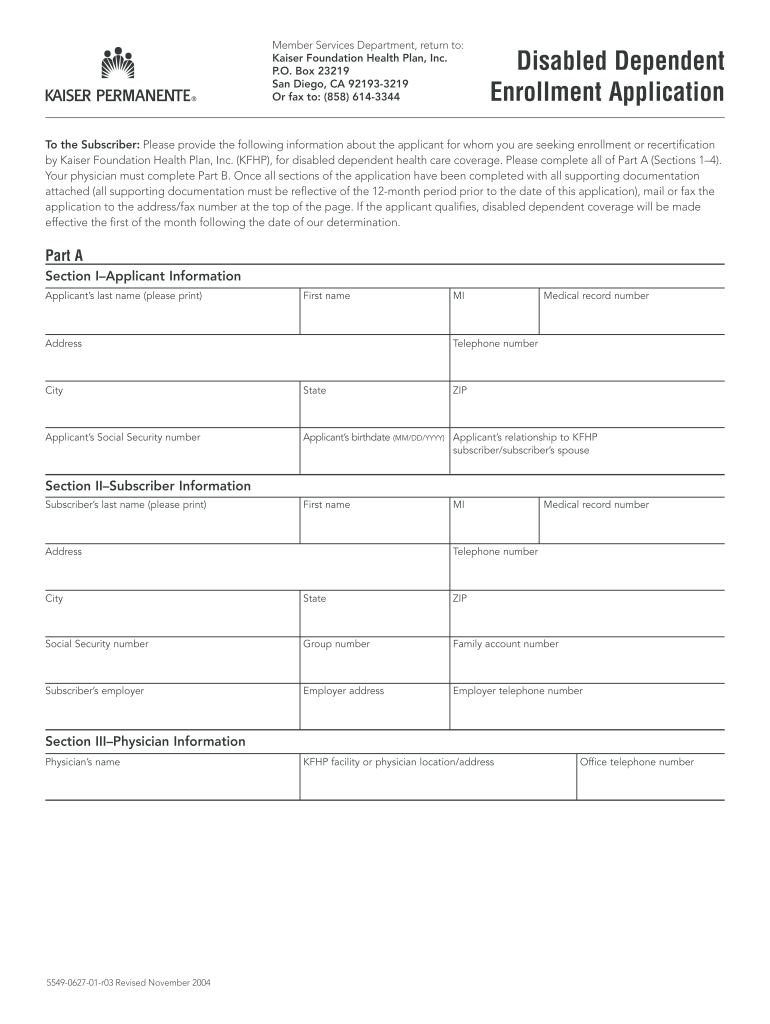
Filling out the Kaiser Permanente 5549-0627-01-r03 form for disabled dependent enrollment is essential for those seeking coverage. This guide provides clear, step-by-step instructions to help you complete the application accurately and efficiently.
Follow the steps to complete the enrollment application successfully.
- Press the ‘Get Form’ button to access the Kaiser Permanente 5549-0627-01-r03 document and open it in your preferred editor.
- Begin with Part A, which gathers essential information about the applicant. Fill in the applicant's last name, first name, address, and contact information in Section I.
- Continue to Section II for subscriber information. Enter the subscriber’s last name, first name, and relevant details including address and Social Security number.
- In Section III, provide the physician information. Include the physician’s name and contact details, ensuring accuracy for follow-up.
- Proceed to Section IV, the Subscriber Questionnaire. Carefully read each statement and respond with ‘Yes’ or ‘No’. Be sure to provide comprehensive explanations where necessary.
- If applicable, list the dependent’s average monthly living expenses in detail, and ensure the information reflects the past 12 months.
- Once all information is completed in Part A, save any supporting documents and proceed to have the physician complete Part B.
- After completing Parts A and B, review the entire application for any errors or missing information.
- Finally, save the document in your desired file format. You can then download, print, or share the completed form as needed.
Take action now and complete your enrollment application online.
Experience a faster way to fill out and sign forms on the web. Access the most extensive library of templates available.
Related content
Apr 1, 2008 — 0001780. Aire Rite Air Cond & Ref Inc. 15122 BOLSA CHICA ST, HUNTINGTON...
Get answers to your most pressing questions about US Legal Forms API.
How to download immunization record MyChart?
To download your immunization record from MyChart, first log into your MyChart account. Navigate to the immunization section, where you can view and download your records securely. This streamlined process helps you maintain important vaccination information linked to your Kaiser Permanente 5549-0627-01-r03 coverage.
How to download test results from Kaiser?
You can download your test results from Kaiser by logging into your account on the Kaiser Permanente website. Once logged in, visit the test results section to view and download your results. This convenient access is part of your benefits under the Kaiser Permanente 5549-0627-01-r03 policy.
How to print vaccine records from Kaiser?
Printing your vaccine records from Kaiser is easy. After logging into your Kaiser Permanente account, navigate to the vaccine records area, where you can view your information. From there, simply select the print option to obtain a physical copy, ensuring you have access to your records related to the Kaiser Permanente 5549-0627-01-r03 plan.
How to download Kaiser immunization records?
To download your Kaiser immunization records, log into your Kaiser Permanente account. Once logged in, go to the immunization records section to download the necessary documents. This process allows you to keep track of your vaccinations under the Kaiser Permanente 5549-0627-01-r03 coverage.
Where can I download my medical records?
You can easily download your medical records through the Kaiser Permanente My Health Manager portal. After logging in, navigate to the medical records section, where you can view and download your documents. Accessing your records is vital for understanding your health history under the Kaiser Permanente 5549-0627-01-r03 plan.
How do I check my Kaiser eligibility?
To verify your Kaiser eligibility, visit the Kaiser Permanente website and log into your account. You will find a section that outlines your eligibility status and available plans. If you have questions, reach out to member support for guidance related to your coverage under the Kaiser Permanente 5549-0627-01-r03 plan.
How do I check my Kaiser Permanente coverage?
Checking your Kaiser Permanente coverage is straightforward. Simply log into your Kaiser member account online, where you can view your coverage details. Alternatively, you can call the member services number for assistance in understanding your benefits under the Kaiser Permanente 5549-0627-01-r03 policy.
How to get Kaiser policy number?
To obtain your Kaiser policy number, you can log into your Kaiser Permanente account using your credentials. If you prefer, you can contact Kaiser customer service, where a representative can assist you in retrieving your policy number. Remember, this number is essential for accessing benefits and services under the Kaiser Permanente 5549-0627-01-r03 plan.
What is the enrollment code for Kaiser Permanente?
The enrollment code for Kaiser Permanente 5549-0627-01-r03 is vital for accurate enrollment and benefit retrieval. This code is usually listed on your member ID card and is necessary when accessing various services. For any uncertainties, you can always contact customer support, who can guide you through the process efficiently.
What is the enrollment code on the insurance card?
The enrollment code on your insurance card identifies your specific health plan and ensures you receive the correct benefits. For those enrolled in Kaiser Permanente 5549-0627-01-r03, this code can typically be found near your member ID or group information. If you’re ever uncertain, don’t hesitate to reach out to customer service for clarification.
Use professional pre-built templates to fill in and sign documents online faster. Get access to thousands of forms.
If you believe that this page should be taken down, please follow our DMCA take down process here.