Loading
Get Infシ︎iqma Https Docs Google Com Forms D E 1faipqlse2tnz9xlri6rohbkt0gnxot56sr2g0vlgul1o99
How it works
-

Open form follow the instructions
-

Easily sign the form with your finger
-

Send filled & signed form or save
How to fill out the Infシ︎iqma Https Docs Google Com Forms D E 1faipqlse2tnz9xlri6rohbkt0gnxot56sr2g0vlgul1o99 online
This guide provides clear and supportive instructions on how to complete the Infシ︎iqma form online. By following these steps, users can efficiently provide their information and feedback.
Follow the steps to successfully fill out the form.
- Click the ‘Get Form’ button to obtain the form and access it in your preferred editor.
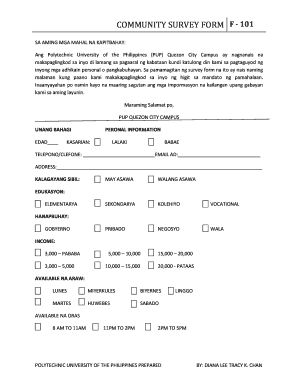
- Begin by entering your personal information in the designated fields, which include your age, gender, contact number, email address, and address.
- Indicate your civil status by selecting the appropriate option from the choices provided: 'married' or 'unmarried.'
- In the education section, specify your highest educational attainment by selecting from options like 'elementary,' 'secondary,' 'college,' or 'vocational.'
- For the income section, choose the income range that best reflects your financial situation.
- Indicate your available days by checking the boxes next to the days you can participate: 'Monday,' 'Tuesday,' 'Wednesday,' 'Thursday,' 'Friday,' 'Saturday,' or 'Sunday.'
- Select your preferred time slots for availability, ensuring to indicate whether you are available from '8 AM to 11 AM,' '11 AM to 2 PM,' or '2 PM to 5 PM.'
- In the section regarding topics of interest, check all relevant boxes to specify what you wish to learn, such as 'parenting & teaching,' 'career orientation,' and other available topics.
- In the evaluation section, respond to the statements about the program by selecting 'yes' or 'no' and provide any comments or additional thoughts in the space provided.
- Finally, ensure all information is accurate, save any changes, and proceed to download, print, or share the completed form as necessary.
Complete your documents online to ensure a smooth submission process.