Get Humana Gn-97054-rr 2005-2026
How it works
-

Open form follow the instructions
-

Easily sign the form with your finger
-

Send filled & signed form or save
How to fill out the Humana GN-97054-RR online
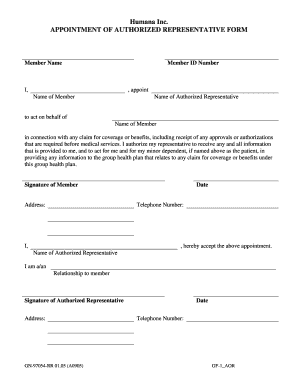
Filling out the Humana GN-97054-RR form can be an essential step in appointing a representative to act on your behalf for healthcare-related claims. This guide will provide you with clear, step-by-step instructions to complete the form accurately and efficiently.
Follow the steps to successfully complete the appointment of authorized representative form.
- Click the ‘Get Form’ button to access the Humana GN-97054-RR form and open it in your preferred editor.
- Begin by entering the member's name in the designated field. Ensure the name is spelled correctly to avoid any issues during the claim process.
- Next, input the member ID number accurately. This number is crucial for identification purposes within the health plan.
- In the section labeled 'I, appoint', write your name to confirm your intent to appoint an authorized representative.
- Enter the name of the authorized representative in the provided field. This person will be able to act on your behalf.
- Reiterate the member's name in the next field to specify who the representative is acting for.
- Your signature is required in the designated area to validate the appointment. This step confirms that you authorize the representative to act for you.
- Fill out the address, date, and telephone number. These details ensure the health plan can reach both you and your authorized representative.
- In the section where the authorized representative accepts the appointment, they should write their name and indicate their relationship to you.
- The authorized representative must also sign and provide their address, date, and telephone number in the respective fields.
- Once all fields are completed, review the form for accuracy. After ensuring all information is correct, you can save the changes, download, print, or share the form as required.
Complete your Humana GN-97054-RR form online today for efficient handling of your healthcare claims.
To obtain your MyHumana insurance card, start by visiting the MyHumana website or downloading the app. Log in with your credentials, or create an account if you haven't done so. Once you're logged in, you can view and download your insurance card, which is associated with your Humana GN-97054-RR plan. If you encounter any issues, Humana's support team can help you quickly resolve them.