Loading
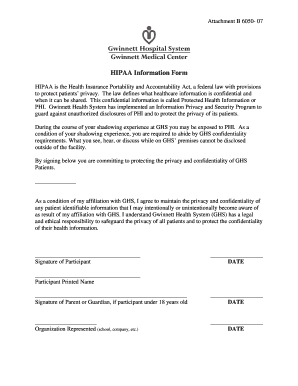
Get Gwinnett Medical Cente Hipaa Information Form
How it works
-

Open form follow the instructions
-

Easily sign the form with your finger
-

Send filled & signed form or save
How to fill out the Gwinnett Medical Cente HIPAA Information Form online
Filling out the Gwinnett Medical Cente HIPAA Information Form is an important step in ensuring the confidentiality of patients' health information. This guide provides clear, step-by-step instructions on how to complete the form online, making it easy to navigate even for those with limited legal experience.
Follow the steps to successfully fill out the form
- Click the ‘Get Form’ button to access the HIPAA Information Form. This action will enable you to download the form and begin the completion process.
- Identify and understand the purpose of the form. This document commits you to maintain the privacy and confidentiality of any patient identifiable information you may encounter during your shadowing experience.
- Fill in the participant's printed name in the designated field provided on the form. Make sure to use the full legal name as it appears on official documents.
- If the participant is under 18 years old, a parent or guardian must sign in the appropriate section. Ensure that the signature matches the name printed above.
- Indicate the organization represented, such as the name of your school or company, in the designated space. This provides context for your affiliation with Gwinnett Health System.
- Sign the form in the designated area to commit to the confidentiality agreement. Check to ensure that all signatures are dated and correctly placed.
- Review the completed form for accuracy and ensure all fields are filled in correctly. Once satisfied, proceed to save your changes.
- Finish by downloading the completed form, printing it out for your records, or sharing it as necessary.
Complete your Gwinnett Medical Cente HIPAA Information Form online today to ensure the protection of patient privacy.
To effectively fill out the Gwinnett Medical Center HIPAA Information Form, start by carefully reading the instructions. Provide your complete information, specify the records you want, and ensure your signature is clear. After completing the form, double-check for accuracy to facilitate a smooth processing experience.