Loading
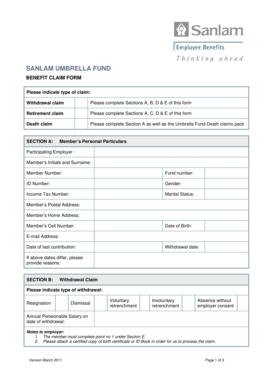
Get Sanlam Umbrella Fund Benefit Claim Form
How it works
-

Open form follow the instructions
-

Easily sign the form with your finger
-

Send filled & signed form or save
How to fill out the Sanlam Umbrella Fund Benefit Claim Form online
This guide provides detailed instructions on completing the Sanlam Umbrella Fund Benefit Claim Form online. By following these steps, users can ensure that they accurately provide the necessary information to process their claims effectively.
Follow the steps to complete your claim form successfully.
- Click ‘Get Form’ button to access the Sanlam Umbrella Fund Benefit Claim Form and open it for editing.
- In Section A, fill in your personal details including your participating employer, initials and surname, member number, fund number, ID number, gender, income tax number, marital status, postal and home addresses, cell number, date of birth, e-mail address, date of last contribution, and withdrawal date. If the dates differ, provide reasons for any discrepancies.
- For Section B, indicate the type of withdrawal claim you are filing by selecting one option: resignation, dismissal, voluntary retrenchment, involuntary retrenchment, or absence without employer consent. Also, provide your annual pensionable salary on the date of withdrawal.
- If you are filing a retirement claim, complete Section C by indicating the type of retirement (early, normal, late, or ill-health) and your annual pensionable salary on your retirement date.
- In Section D, answer the questions regarding any claims against the member’s benefit including divorce orders, maintenance orders, prior claims by the employer, and housing loans/guarantees. Attach the relevant documents where applicable.
- Complete Section E by selecting your payment options based on the type of claim (withdrawal or retirement). Specify the percentage or amount you wish to be paid in cash if applicable, and provide the necessary details for the transfer.
- Fill in your banking details to ensure payments are directed to your account. Indicate the type of account you have, and attach a copy of your bank statement.
- Sign the declaration section to confirm that the information provided is accurate and complete. Ensure that the employer representative also signs if necessary.
- Once all sections are completed, save your changes. You can then download, print, or share the form as needed.
Complete your Sanlam Umbrella Fund Benefit Claim Form online to ensure a smooth claims process.
Related links form
Withdrawal claims are paid within 4.5 working days, with approx. 2000 claims processed each month. Contributions invested right away. 99% of contributions are invested within 1 day of receipt.