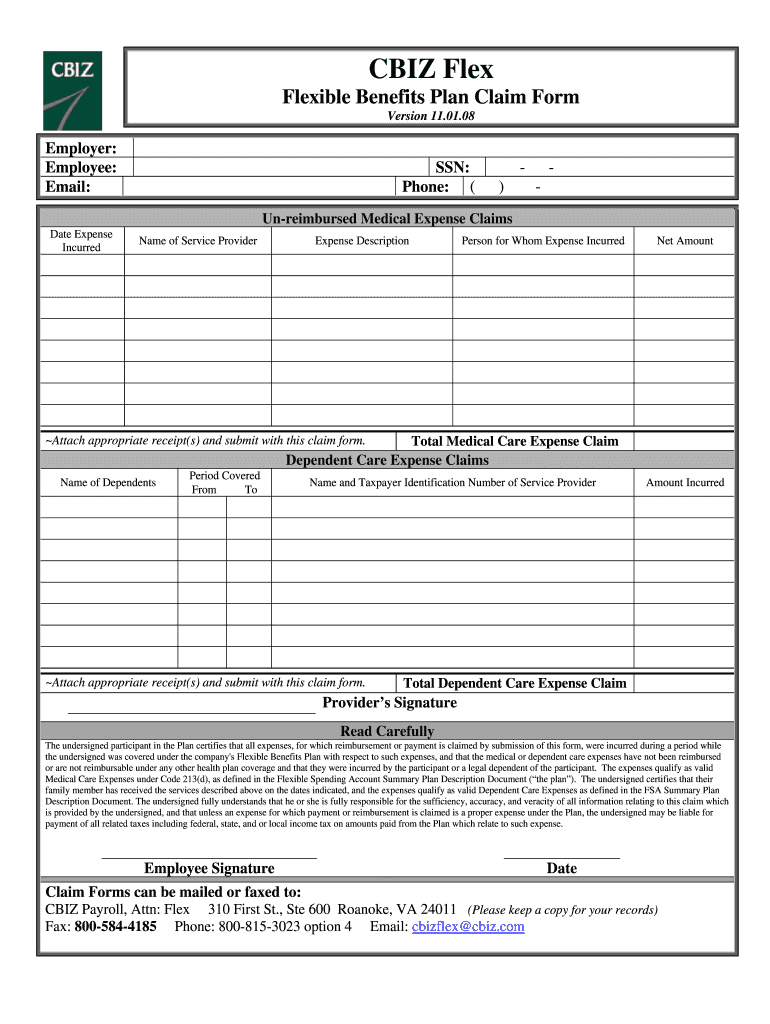
CBIZ Flex Flexible Benefits Plan Claim Form Version 11. 01. 08 Employer Email SSN Phone - Un-reimbursed Medical Expense Claims Date Expense Incurred Name of Service Provider Expense Description Person for Whom Expense Incurred Net Amount Attach appropriate receipt s and submit with this claim form. Total Medical Care Expense Claim Dependent Care Expense Claims Name of Dependents Period Covered From To Name and Taxpayer Identification Number of Service Provider Amount Incurred Total Dependent Care Expense Claim Provider s Signature Read Carefully The undersigned participant in the Plan certifies that all expenses for which reimbursement or payment is claimed by submission of this form were incurred during a period while or are not reimbursable under any other health plan coverage and that they were incurred by the participant or a legal dependent of the participant. The expenses qualify as valid Medical Care Expenses under Code 213 d as defined in the Flexible Spending Account Summary P....
Loading

Open form follow the instructions

Easily sign the form with your finger

Send filled & signed form or save
How to fill out the CBIZ Flex Flexible Benefits Plan Claim Form online
Filling out the CBIZ Flex Flexible Benefits Plan Claim Form online can be a straightforward process when you understand the necessary steps. This guide will provide detailed instructions to help you navigate through each section of the form with ease.
Follow the steps to complete the claim form accurately.
- Click ‘Get Form’ button to access the claim form and open it in your preferred digital editor.
- Begin by entering the employer's name in the designated field at the top of the form. This identifies your employer within the claim process.
- Fill in your personal information, including your name, email address, social security number, and phone number. This essential data links the claim to your account.
- For un-reimbursed medical expense claims, provide the date the expense was incurred, the name of the service provider, a description of the expense, the person's name for whom the expense was incurred, and the net amount. Ensure to attach appropriate receipt(s) documenting these expenses.
- If applicable, complete the dependent care expense claims section. List the names of dependents, the period covered for the claim, the name and taxpayer identification number of the service provider, and the amount incurred. Again, attach the necessary receipts for these expenses.
- In the certification area, review the statement carefully. By signing, you affirm that all submitted expenses were incurred while you were covered under the Flexible Benefits Plan and have not been reimbursed elsewhere.
- Sign and date the form to validate your claim. This ensures authenticity and acknowledges responsibility for the information provided.
- Once complete, you can save changes to your document. Choose to download, print, or share the form as necessary. If you need to submit the form, you may mail or fax it to the listed contact information, ensuring you keep a copy for your records.
Complete your CBIZ Flex Flexible Benefits Plan Claim Form online today for a smooth reimbursement experience.
Experience a faster way to fill out and sign forms on the web. Access the most extensive library of templates available.
Related content
CBIZ Complete Benefits Administration System (CBAS) Enrollment Guide ... Health...
Instructions for Quick Claims Processing: 1. Fully complete & sign the claim form. 2...
Get answers to your most pressing questions about US Legal Forms API.
How do I file a claim with FSA?
Filing a claim with your FSA requires utilizing the CBIZ Flex Flexible Benefits Plan Claim Form. Start by carefully filling out the required fields, providing details on your expenses. Attach any supporting documents, such as receipts and invoices that highlight the services received. Finally, ensure you submit your claim to the correct address and keep a copy for your records to make the process smooth and straightforward.
How to submit a claim for FSA?
To submit a claim using the CBIZ Flex Flexible Benefits Plan Claim Form, first, gather all necessary documentation, including receipts for eligible expenses. Complete the form with accurate information and attach your receipts. After reviewing your submission for completeness, send it to the designated claims department as outlined in your plan documents. Tracking your claim ensures you stay informed about the processing status.
Do I need to claim my FSA on my taxes?
Generally, you do not need to include your Flexible Spending Account (FSA) contributions on your tax returns, as they are pre-tax dollars. However, you must keep track of your medical expenses that you receive reimbursement for. It's wise to consult with a tax professional for specific guidance related to your tax situation. This will ensure you fully understand your responsibilities and benefits concerning your CBIZ Flex Flexible Benefits Plan Claim Form.
How do I file a claim with Cbiz?
Log in to the consumer portal at myplans.cbiz.com and select File a Claim under the Accounts link. Download the Mobile App through the AppStore or Google Play and search for “My Plans by CBIZ.”
What can I use my Cbiz card for?
The CBIZ Debit Card is only accepted at qualified locations where Visa debit cards are accepted. Qualified locations may include hospitals, doctor's offices, pharmacies, online drug stores, and day care centers. Card swipes are processed as credit card transactions.
What does an FSA pay for?
Flexible spending account (FSA): A benefit plan that lets people put money aside in special accounts, pre-tax, to help pay for certain medical costs, child care, and other health services. Insurance coverage provided by or through UnitedHealthcare Insurance Company or its affiliates.
Can I use my FSA card for gas?
Fuel is eligible for transportation to and from medical care, up to the allowed mileage rate. Fuel, gasoline for medical care reimbursement is eligible with a flexible spending account (FSA), health savings account (HSA) or a health reimbursement arrangement (HRA).
What can I buy with my FSA card?
You can spend FSA funds to pay deductibles and copayments, but not for insurance premiums. You can spend FSA funds on prescription medications, as well as over-the-counter medicines with a doctor's prescription. Reimbursements for are allowed without a prescription.
What qualifies for FSA expenses?
Allowed expenses include insurance copayments and deductibles, qualified prescription drugs, , and medical devices. You decide how much to put in an FSA, up to a limit set by your employer. You aren't taxed on this money.
Use professional pre-built templates to fill in and sign documents online faster. Get access to thousands of forms.
If you believe that this page should be taken down, please follow our DMCA take down process here.