Loading
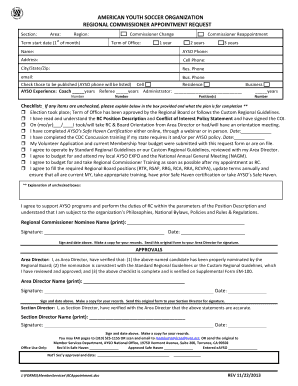
Get Rc Appointment Request Bformb - Ayso
How it works
-

Open form follow the instructions
-

Easily sign the form with your finger
-

Send filled & signed form or save
How to fill out the RC Appointment Request BFormb - AYSO online
The RC Appointment Request BFormb is essential for those looking to serve as Regional Commissioners within the American Youth Soccer Organization (AYSO). This guide offers a clear and user-friendly approach to completing the form online, ensuring you provide all necessary information accurately.
Follow the steps to successfully complete the form online.
- Press the ‘Get Form’ button to access the RC Appointment Request BFormb and open it in your preferred online document editor.
- Begin by filling out the general information section, which includes specifying the area and region where you will serve. Ensure to select either 'Commissioner Change' or 'Commissioner Reappointment' as applicable.
- Indicate the term length for your office, selecting between 1 year, 2 years, or 3 years as desired.
- Provide your name, phone numbers, email address, and full residential address accurately.
- Check the boxes for the contact numbers you want published, such as your AYSO phone number, while ensuring compliance with privacy preferences.
- Detail your AYSO experience, including years as a coach, referee, or administrator.
- Complete the checklist section. Where applicable, explain any unchecked items in the space provided.
- Sign and date the form at the designated spaces to indicate your agreement to the terms and conditions outlined.
- Save your changes regularly and review the filled form for completeness before finalizing.
- Download, print, or share the completed form as required, ensuring that it is submitted to your Area Director for the necessary approvals.
Complete the RC Appointment Request BFormb online to take the next step in your journey with AYSO.