Loading
Get Printable Panel Schedule
How it works
-

Open form follow the instructions
-

Easily sign the form with your finger
-

Send filled & signed form or save
How to fill out the Printable Panel Schedule online
Filling out the Printable Panel Schedule online can streamline your project organization and power management processes. This guide provides clear instructions to help you complete the form accurately and effectively.
Follow the steps to complete the Printable Panel Schedule online.
- Press the ‘Get Form’ button to access the Printable Panel Schedule and open it in your preferred form editor.
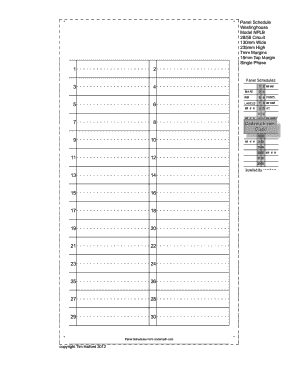
- Begin by entering the panel name in the designated field. This should reflect the specific name you wish to assign to your panel for identification purposes.
- Next, fill in the panel location field. Specify where the panel will be installed to provide context for its usage.
- Complete the numbered fields from 1 to 30, as applicable, providing all necessary details relevant to your electrical panel setup. Ensure accuracy as this data is critical for effective management.
- Note that fields 29 and 30 are not used for single-phase installations. Ensure you skip these when applicable.
- In the 'Installed by' section, indicate the name of the person or team responsible for the panel installation to establish accountability.
- Review all the information you have entered in the form for any inaccuracies or missing details to ensure completion.
- Once satisfied with the completed form, you can save the changes, download the document, print it for physical records, or share it as needed.
Start filling out your Printable Panel Schedule online today for an efficient project management experience.
Related links form
Create a panel schedule Click Analyze tab Reports & Schedules panel Panel Schedules. Note: You can also open the Create Panel Schedules dialog by using the keyboard shortcut, PS . In the Create Panel Schedules dialog, select one or more panels, and click OK.