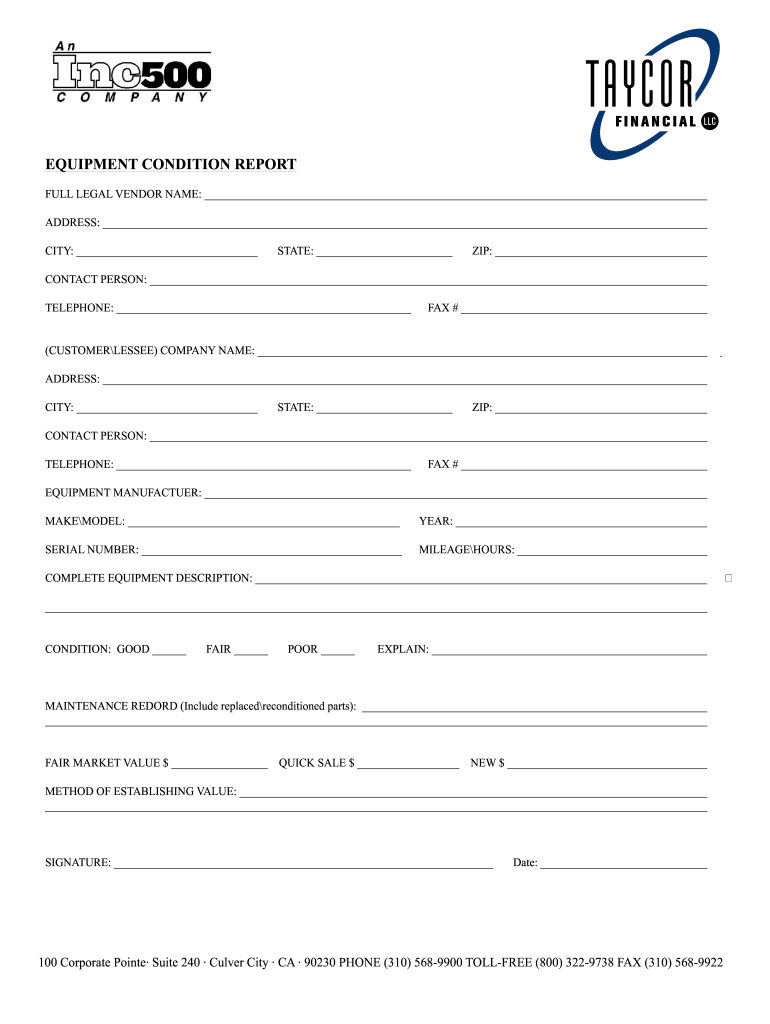
__________________ ADDRESS: ___________________________________________________________________________________________________________ CITY: ________________________________ STATE: ________________________ ZIP: ______________________________________ CONTACT PERSON: ___________________________________________________________________________________________________ TELEPHONE: ____________________________________________________ FAX # _____________________________________________ (CUSTOMER\LE.
Loading

Open form follow the instructions

Easily sign the form with your finger

Send filled & signed form or save
How to fill out the An Inc500 Company Equipment Condition Report online
Filling out the An Inc500 Company Equipment Condition Report online is a straightforward process that ensures you accurately document the condition and details of equipment. This guide provides step-by-step instructions to help you complete the form efficiently.
Follow the steps to complete the equipment condition report online.
- Click ‘Get Form’ button to access the form and open it in your preferred online editor.
- Enter the full legal vendor name in the designated field at the top of the form.
- Fill in the address, city, state, and ZIP code of the vendor in the appropriate fields.
- Provide the name and contact details of a person at the vendor's company, including their telephone and fax number.
- In the next section, input the customer or lessee company name and address, followed by the respective city, state, and ZIP code.
- Similar to step 4, enter the contact person's name and their telephone and fax numbers for the customer or lessee.
- Indicate the equipment manufacturer, along with the make and model of the equipment.
- Record the year of the equipment, its serial number, and relevant mileage or hours used.
- Provide a complete equipment description to give detailed insights into the specific item.
- Assess the equipment's condition by marking one of the options: good, fair, or poor. Provide explanations if necessary.
- Document the maintenance record, including any replaced or reconditioned parts.
- Fill in the fair market value, quick sale value, and new value of the equipment in the respective fields.
- Explain the method used to establish the equipment's value in the provided space.
- Sign the document and include the date to validate the report.
- Once you have completed all sections, save your changes, download, print, or share the form as required.
Complete your document online today for a seamless equipment condition report experience.
Experience a faster way to fill out and sign forms on the web. Access the most extensive library of templates available.
Related content
In June 2018, the Company executed a note for $68.9 thousand to purchase equipment to be...
Jan 9, 2020 — The University of Massachusetts Dartmouth Center for Marketing Research...
Mar 4, 2016 — Property and Equipment. The Company states property and equipment at cost...
Get answers to your most pressing questions about US Legal Forms API.
What is the purpose of the equipment status report?
An equipment status report serves to outline the current functionality and performance of machinery. This report acts as a management tool, helping you understand what equipment is operational, what requires attention, and what may soon need repairs. Regular updates ensure you stay ahead of potential issues. An Inc500 Company Equipment Condition Report can streamline this reporting process, providing consistent and reliable information.
What is the purpose of the condition report?
The purpose of a condition report is to provide a comprehensive evaluation of equipment status, enabling better decision-making. It serves as a record that can inform repairs, replacements, or upgrades, ultimately enhancing operational efficiency. With regular condition reports, businesses can preemptively address potential issues before they escalate. An Inc500 Company Equipment Condition Report supports this initiative by offering a structured format for assessments.
How to write an equipment report?
To write an effective equipment report, start by gathering all relevant data about the machinery in question. Document its current condition, including any noted issues or maintenance history. It's important to use clear, concise language and to categorize findings logically. Leveraging An Inc500 Company Equipment Condition Report can simplify this process, helping you present the information in an organized manner.
What is condition reporting?
Condition reporting involves systematically documenting the status and functionality of equipment. This practice allows businesses to track performance, identify potential issues, and plan for maintenance. By keeping accurate condition reports, organizations can avoid costly downtimes and ensure smooth operations. An Inc500 Company Equipment Condition Report facilitates this ongoing process, providing clarity and actionable insights.
What is equipment condition?
Equipment condition refers to the overall state of your machinery, encompassing its performance, reliability, and maintenance needs. Understanding the condition of your equipment helps in making informed decisions about repairs or replacements. Regularly assessing equipment condition is vital for maintaining productivity. An Inc500 Company Equipment Condition Report serves as an effective tool in documenting this information.
What is the condition report for equipment?
A condition report for equipment provides detailed insights into the state of your machinery. It highlights any wear and tear, damages, or necessary repairs. For businesses, such reports are crucial for maintaining operational efficiency and safety. Utilizing An Inc500 Company Equipment Condition Report ensures that you have a comprehensive overview of your equipment's health.
What is an equipment status report?
An equipment status report provides a summary of an asset's performance level and operational readiness. It highlights completed inspections, necessary repairs, and future maintenance schedules. By leveraging an Inc500 Company Equipment Condition Report, organizations can keep their equipment running smoothly and efficiently.
What is an equipment inspection report?
An equipment inspection report is a formal document that details the findings of an equipment examination. This report evaluates the performance, safety, and condition of machinery, offering valuable insights for maintenance planning. Relying on an Inc500 Company Equipment Condition Report can ensure thorough inspections and promote longevity in your equipment.
How to write a report example?
When creating a report example, first define the report's purpose and audience. Present your findings logically, using headings and bullet points for ease of understanding. Tailoring your example according to the format seen in an Inc500 Company Equipment Condition Report can guide your content structure, making it easier for readers to digest the information.
How to write an equipment failure report?
When writing an equipment failure report, identify the equipment involved, noting its specifications. Clearly document the failure event, including time, date, and circumstances leading to the failure. Make sure to include corrective actions taken and recommendations to prevent future occurrences, following the structured format of an Inc500 Company Equipment Condition Report for clarity.
Use professional pre-built templates to fill in and sign documents online faster. Get access to thousands of forms.
If you believe that this page should be taken down, please follow our DMCA take down process here.