Loading
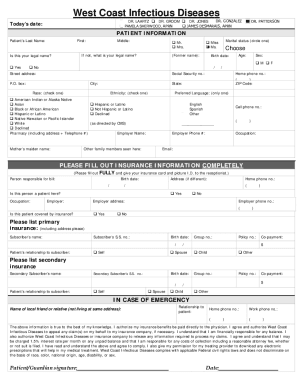
Get West Coast Infectious Diseases Patient Forms 2021-2026
How it works
-

Open form follow the instructions
-

Easily sign the form with your finger
-

Send filled & signed form or save
How to fill out the West Coast Infectious Diseases Patient Forms online
Filling out the West Coast Infectious Diseases Patient Forms online is an essential step in preparing for your medical appointment. This guide provides clear and detailed instructions to help users complete these forms accurately and confidently.
Follow the steps to fill out the patient forms easily.
- Click ‘Get Form’ button to access the patient forms and open it in your preferred editor.
- Begin by entering your personal information. This includes your first and last name, middle initial, age, date of birth, contact numbers, and preferred language.
- Complete the patient information section, specifying your legal name and any previous names if applicable. Be sure to provide your address and insurance details as clearly as possible.
- Fill in the insurance information completely. Include the name of the policyholder, their social security number, and the patient’s relationship to the subscriber.
- Provide emergency contact information. This includes the name and relationship of a local friend or relative, along with their contact numbers.
- Complete the medical history section. This involves checking off any relevant medical history, allergies, and listing current medications.
- Review the Controlled Substances Agreement and initial each condition to indicate your understanding and agreement.
- Sign and date the forms where required, particularly authorizing discussions about your Protected Health Information.
- Finally, ensure all fields are filled out accurately. Save changes, and if needed, download, print, or share the form for submission.
Complete your patient forms online today for a smoother visit.