Loading
Get Ut Commercial Lease Agreement 2015-2026
How it works
-

Open form follow the instructions
-

Easily sign the form with your finger
-

Send filled & signed form or save
How to fill out the UT Commercial Lease Agreement online
Filling out the UT Commercial Lease Agreement online can be a straightforward process if you follow the correct steps. This guide will provide you with clear instructions to help you complete the form accurately and efficiently.
Follow the steps to fill out the UT Commercial Lease Agreement online.
- Click ‘Get Form’ button to obtain the form and open it in the editor.
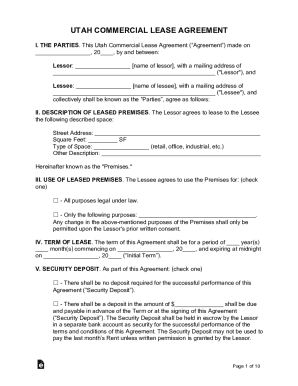
- In the first section titled 'THE PARTIES', enter the name and mailing address of both the Lessor and Lessee. These details are crucial as they identify the parties entering into the lease agreement.
- In the 'DESCRIPTION OF LEASED PREMISES' section, provide the street address, square footage, and type of space being leased. This information defines the specific premises being rented.
- In the 'USE OF LEASED PREMISES' section, select whether the Premises will be used for all legal purposes or specify particular uses. This selection dictates how the Premises can be utilized.
- Fill out the 'TERM OF LEASE' section by indicating the period of lease, including the start date and expiration date. This gives clarity on the duration of the lease agreement.
- Complete the 'SECURITY DEPOSIT' field by checking appropriate options and stating the deposit amount if applicable. This ensures both parties understand the financial commitment.
- In the 'RENT' section, enter the monthly rent amount and any additional percentage rent, if applicable. This gives transparency on the rental expectations.
- Fill in the 'LATE FEE' section by selecting the applicable late charge and stipulating the rate or fixed amount. This detail outlines consequences for late payments.
- Select the appropriate expense structure in the 'EXPENSES' subsection, whether it is Gross, Modified Gross, or Triple Net, and define what expenses are included each month.
- In the 'OPTION TO RENEW' section, check if the Lessee has renewal rights and specify terms if applicable. This ensures clarity on the renewal process.
- Review all sections and enter any additional information required in the 'ADDITIONAL TERMS & CONDITIONS'.
- Finally, have both parties sign the agreement in the designated areas for the Lessee and Lessor. Make sure to have notarization if required to validate the agreement.
- After completing the form, you can save changes, download, print, or share the document as needed.
Start filling out the UT Commercial Lease Agreement online today!
"Consumer lease" means a lease that a lessor, regularly engaged in the business of leasing or selling, makes to a lessee, who is an individual and who takes under the lease primarily for a personal, family, or household purpose. "Fault" means wrongful act, omission, breach, or default.