Loading
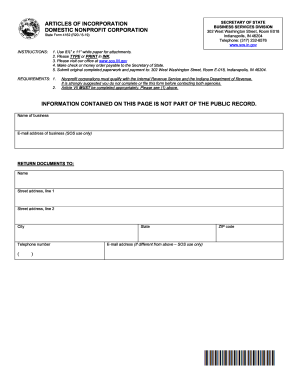
Get In Sf 4162 2019-2026
How it works
-

Open form follow the instructions
-

Easily sign the form with your finger
-

Send filled & signed form or save
How to fill out the IN SF 4162 online
Filling out the IN SF 4162, the Articles of Incorporation for a domestic nonprofit corporation, can seem daunting at first. This guide aims to provide you with clear, step-by-step instructions to help you navigate this important document and complete it online.
Follow the steps to accurately complete the form.
- Click the ‘Get Form’ button to access the form and open it in your editor.
- Begin by entering the name of the business in the designated field. Ensure that the name includes the words Corporation, Incorporated, Limited, Company, or an appropriate abbreviation.
- Provide the email address of the business. This will be used solely by the Secretary of State.
- Fill in the return documents' information, including the name and street address of the individual to receive the documents.
- Enter the city, state, and ZIP code of the principal office of the corporation and provide a telephone number.
- In Article II, state the purpose of the corporation. Specific language may be required to achieve IRS 501(c) status, so consult the IRS if necessary.
- In Article III, select the type of corporation by checking the appropriate box: public benefit, religious, or mutual benefit.
- Complete Article IV by providing the name of either a commercial registered agent or a noncommercial registered agent, including their respective addresses.
- Indicate in Article V whether the corporation will have members by checking 'Yes' or 'No members'.
- List the names and addresses of the incorporators in Article VI. Please note that these cannot be amended once filed.
- Article VII requires you to outline the distribution of assets on dissolution or final liquidation. It is essential to include specific language that meets IRS requirements.
- Complete the signature section by signing, printing your name, and providing the date of execution.
- Once all fields are completed accurately, save your changes, and prepare to download, print, or share the form as needed.
Take the first step in establishing your nonprofit by filling out the IN SF 4162 online today.