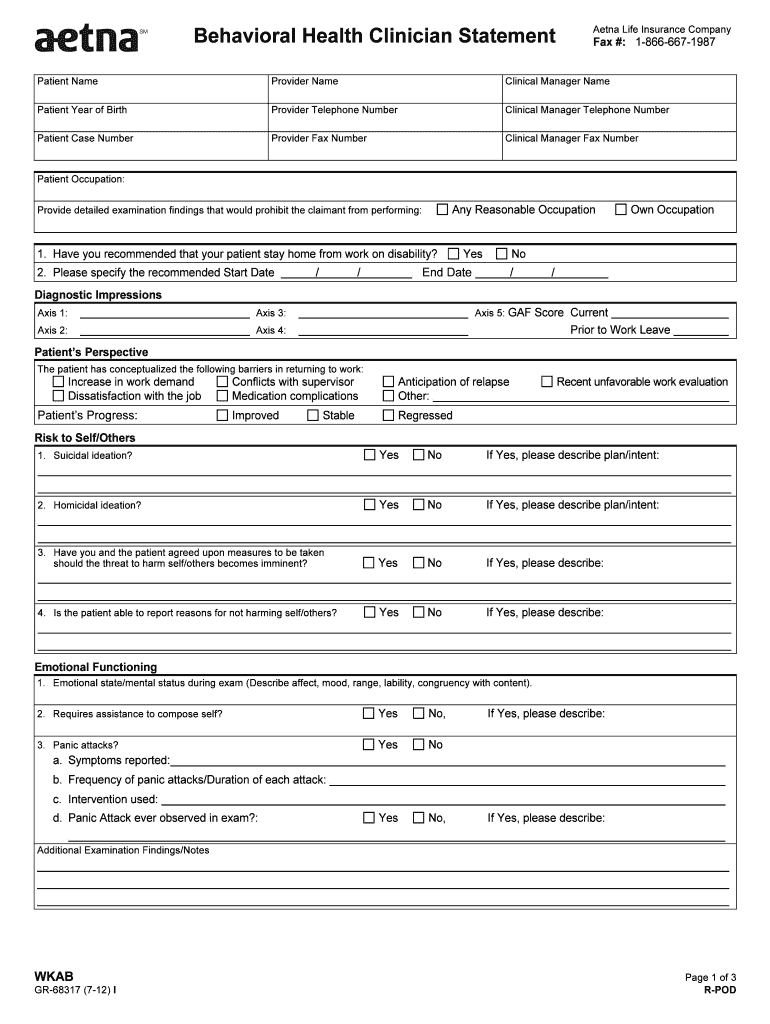
Cal Manager Telephone Number Patient Case Number Provider Fax Number Clinical Manager Fax Number Patient Occupation: Any Reasonable Occupation Provide detailed examination findings that would prohibit the claimant from performing: 1. Have you recommended that your patient stay home from work on disability? 2. Please specify the recommended Start Date / U / U Yes End Date Own Occupation No / U / U Diagnostic Impressions 0B Axis 1: Axis 5: GAF Score Current Axis 3: U Axis 2: A.
Loading

Open form follow the instructions

Easily sign the form with your finger

Send filled & signed form or save
How to fill out the Aenta GR-68317 online
The Aenta GR-68317 is a vital form used in assessing behavioral health claims. This guide provides clear, step-by-step instructions for filling out the form online, ensuring that users can navigate the process with confidence and ease.
Follow the steps to successfully complete the Aenta GR-68317 form.
- Press the ‘Get Form’ button to obtain the form and display it in the appropriate interface.
- Enter the patient’s name in the designated field, ensuring accuracy for identification purposes.
- Fill out the provider's name and clinical manager's name, alongside their respective contact numbers to facilitate communication.
- Input the patient’s year of birth and case number to link the form to the correct claim.
- Document any relevant patient occupation and detailed examination findings that would affect the claimant's ability to work.
- Indicate whether the clinician has recommended that the patient stay home from work and specify the start date if applicable.
- Complete all sections regarding diagnostic impressions, including the Axis scores and any pertinent observations.
- Detail the patient’s progress and barriers to returning to work, including any observations made during the evaluation.
- Fill out questions regarding any risk to self or others, and emotional functioning, describing the patient's state during examination.
- Assess and record the patient's cognitive functioning, memory abilities, and any notable behaviors during the examination.
- Complete the section on activities of daily living, including any changes in appetite, sleep disturbances, and socialization issues.
- Finalise the treatment section by documenting dates, frequencies, and any medications being taken.
- Conclude by completing the claimant's return to work status question and provide the clinician's signature, exam date, and credentials.
- Once all fields are accurately filled, save the changes, and choose an option to download, print, or share the form as needed.
Complete your documents online for a hassle-free experience.
Experience a faster way to fill out and sign forms on the web. Access the most extensive library of templates available.
Related content
A fund files its complete schedule of portfolio holdings with the SEC for the first and...
Jun 30, 2024 — ... Aetna reached agreement on terms of a five-year agreement. A one-year...
Get answers to your most pressing questions about US Legal Forms API.
How do I get a prior authorization from insurance?
To get prior authorization from Aetna GR-68317 or other insurance, start by confirming if your treatment needs authorization. Collaborate with your healthcare provider to prepare and submit a request to Aetna, ensuring all detailed information is included. You can monitor the progress of your request through your member account or by calling Aetna.
How to obtain prior authorization for Aetna?
To obtain prior authorization for Aetna GR-68317, begin by checking your coverage requirements. Gather the necessary medical information and submit it through your provider or directly to Aetna. For updates, you can frequently check your account online or contact Aetna customer service.
How do I get my Aetna prior authorization?
To obtain prior authorization with your Aetna GR-68317 plan, first confirm if your procedure requires it by reviewing your benefits. You or your healthcare provider need to submit the necessary documentation to Aetna. Once submitted, you can track the authorization status through your Aetna member account.
What is the phone number for Aetna prior authorization?
For prior authorization inquiries related to the Aetna GR-68317 plan, you can reach out to the Aetna phone number listed on your insurance card. Alternatively, you can call the general customer service number available on the Aetna website. Make sure to have your member ID ready for a smoother process.
How to find group number on Aetna insurance card?
Your group number can be found easily on your Aetna GR-68317 insurance card. Look for the section labeled 'Group Number' – it is typically located near your member ID. If you have trouble locating it, you can also refer to your policy documents or reach out to Aetna support for assistance.
How do I get an Aetna OTC catalog?
To obtain the Aetna GR-68317 OTC catalog, you can log into your Aetna member account. Navigate to the 'Benefits' section where you can find resources and links for the OTC catalog. You may also receive a catalog by mail, so ensure your address is current with Aetna.
Does Aetna require a referral to see a specialist?
Whether a referral is needed to see a specialist under Aetna GR-68317 typically depends on your specific plan. Many plans do require a referral for specialists to ensure that you receive the appropriate care. To confirm your plan's specific rules, it's best to check your policy documents or contact Aetna customer service.
How to download Aetna insurance card?
To download your Aetna GR-68317 insurance card, first log into your Aetna member account online. Once logged in, navigate to the 'Resources' section and select 'Download ID Cards.' Follow the prompts to access and download your card. If you need further assistance, consider visiting the Aetna support site.
How do I submit a prior authorization to Aetna?
Submitting a prior authorization to Aetna GR-68317 involves a straightforward online process or a phone call to customer support. You will need to provide relevant details about the treatment and medications you require. This step is essential for ensuring that your healthcare providers are covered under your plan.
How do I get my 1095 B form from Aetna?
To obtain your 1095 B form from Aetna GR-68317, you can log into your member portal or contact customer service directly. This form is crucial for tax purposes as it provides proof of your health coverage. Ensuring you have this document on hand helps you stay compliant with tax regulations.
Use professional pre-built templates to fill in and sign documents online faster. Get access to thousands of forms.
If you believe that this page should be taken down, please follow our DMCA take down process here.