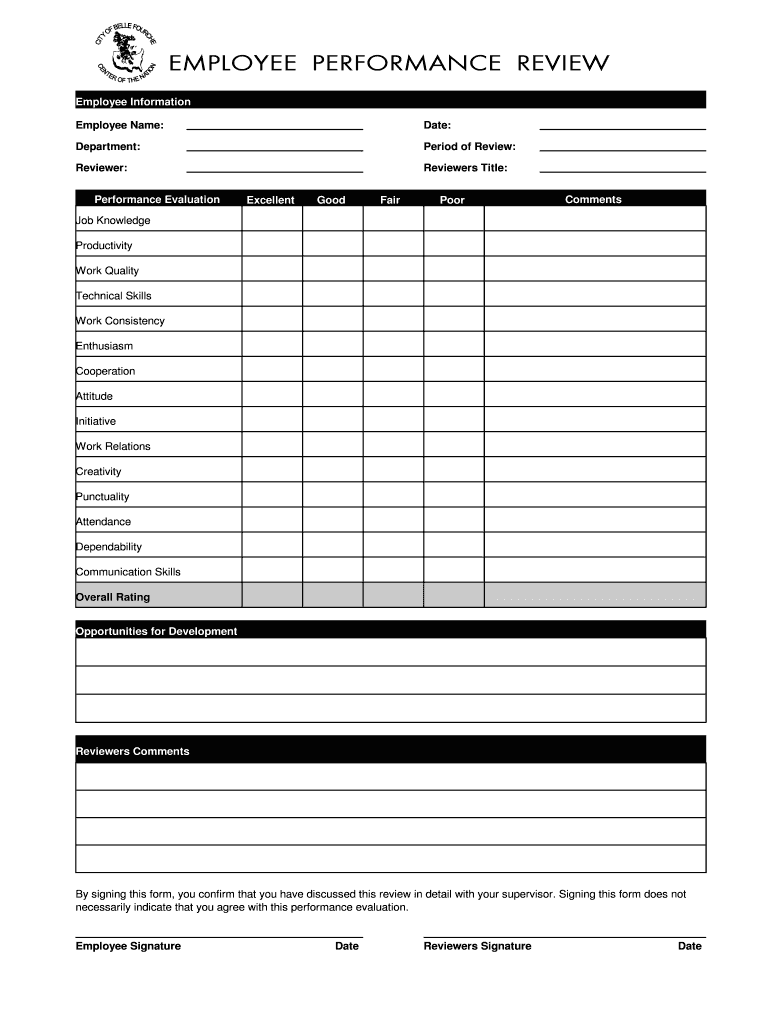
Ob Knowledge Productivity Work Quality Technical Skills Work Consistency Enthusiasm Cooperation Attitude Initiative Work Relations Creativity Punctuality Attendance Dependability Communication Skills Overall Rating Opportunities for Development Reviewers Comments By signing this form, you confirm that you have discussed this review in detail with your supervisor. Signing this form does not necessarily indicate that you agree with this performance evaluation. Employee Signature Date Reviewer.
Loading

Open form follow the instructions

Easily sign the form with your finger

Send filled & signed form or save
How to fill out the SD Belle Fourche Employee Performance Review online
Completing the SD Belle Fourche Employee Performance Review online is an important process that helps evaluate employee performance and provides feedback for development. This guide will walk you through each section of the form to ensure you understand how to fill it out effectively.
Follow the steps to fill out the performance review form with ease.
- Click ‘Get Form’ button to obtain the performance review form and open it in the available editor.
- Begin by filling in the employee information section. Provide the employee's name, date, department, and period of review. Ensure accuracy in this information as it is essential for proper record-keeping.
- In the reviewer section, enter the name of the person conducting the evaluation and their title. This provides context to the review and identifies the evaluator.
- Move on to the performance evaluation section. For each category listed, select a rating of 'Excellent,' 'Good,' 'Fair,' or 'Poor' based on the employee’s performance. Each rating should reflect the assessment of the specific skills and attributes.
- In the comments section next to each rating, provide specific feedback or examples that justify the rating. This commentary supports performance ratings and highlights areas for improvement or commendation.
- After completing the performance evaluation, take the time to fill out the opportunities for development section. Clearly outline suggestions for future growth and skills that the employee may wish to improve.
- In the final section, both the employee and reviewer are required to sign and date the form. By signing, they acknowledge that the review details have been discussed, though this does not imply agreement with the evaluation.
- Once you have completed the entire form, review the information for accuracy. You can then save your changes, download a copy for records, print the form, or share it as needed.
Start completing your SD Belle Fourche Employee Performance Review online today to ensure a comprehensive assessment process.
Experience a faster way to fill out and sign forms on the web. Access the most extensive library of templates available.
Related content
Jun 30, 2024 — 9-1's (the District) annual financial report presents our discussion and...
Bastian, President, Belle Fourche, holds a bachelor's degree in political science from...
This report describes the accumulation of chemical contaminants in river, lake, ocean, and...
Get answers to your most pressing questions about US Legal Forms API.
What are the 5 words of performance review?
The five essential words of a performance review often include goals, feedback, development, improvement, and recognition. These words encapsulate the core purpose of the SD Belle Fourche Employee Performance Review. By focusing on these areas, you can create a constructive dialogue that empowers employees.
How do you complete an employee performance review?
To complete an employee performance review, start by assessing the employee’s contributions over the review period. Collect feedback from various sources, including peers and supervisors, to provide a balanced view. Utilize the resources available through the SD Belle Fourche Employee Performance Review to ensure your assessment is accurate.
How to submit a performance review?
Submitting a performance review typically involves sharing it through your company's HR platform or directly with the employee. Ensure that you follow any specific guidelines laid out by your organization regarding submissions. Adhering to best practices, such as those highlighted in the SD Belle Fourche Employee Performance Review, strengthens the process.
How to complete an employee performance review?
Completing an employee performance review requires thoughtful analysis of the employee’s work habits, accomplishments, and areas for growth. Use notes from previous evaluations and regular feedback to build a comprehensive picture. Ensure that the review captures the essence of the SD Belle Fourche Employee Performance Review to provide clear guidance.
How do you report employee performance?
Reporting employee performance involves collating data on measurable outcomes and qualitative feedback. Summarize findings in a review format that aligns with the SD Belle Fourche Employee Performance Review framework. This ensures the report is both comprehensive and useful for future reference.
How should performance reviews be documented?
Performance reviews should be documented in a clear and organized manner. Use consistent formatting to make it easier to compare and track progress over time. Storing these documents securely within your SD Belle Fourche Employee Performance Review system can help maintain confidentiality and facilitate constructive reviews.
How do you fill out a performance review example?
When filling out a performance review example, look for templates that showcase key performance indicators and narrative sections. Incorporate specific examples that highlight the employee’s contributions and growth. Remember to relate your insights back to the principles of the SD Belle Fourche Employee Performance Review.
How do I fill out an employee performance review form?
To fill out an employee performance review form effectively, start by gathering relevant information about the employee's role and responsibilities. Next, review their performance data, including achievements and areas for improvement. Utilize a structured format to ensure clarity, and keep the focus on the SD Belle Fourche Employee Performance Review to guide your assessments.
How do you politely ask for a performance review?
You can politely ask for a performance review by expressing your eagerness for feedback. Try saying, 'Could we schedule a time to go over my performance? I am eager to learn and improve with your guidance.' This ensures your approach is respectful and constructive in the context of your SD Belle Fourche Employee Performance Review.
How do you write an email asking for a performance review?
When writing an email to ask for a performance review, keep it straightforward and professional. Start by greeting your supervisor, then clearly express your desire for feedback, such as stating, 'I would like to schedule a time to discuss my recent performance.' This sets a positive tone while focusing on your SD Belle Fourche Employee Performance Review.
Use professional pre-built templates to fill in and sign documents online faster. Get access to thousands of forms.
If you believe that this page should be taken down, please follow our DMCA take down process here.