Loading
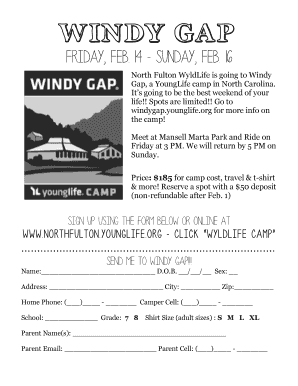
Get Windy Gap Flyer 14.pdf - Young Life North Fulton
How it works
-

Open form follow the instructions
-

Easily sign the form with your finger
-

Send filled & signed form or save
How to fill out the Windy Gap Flyer 14.pdf - Young Life North Fulton online
This guide provides step-by-step instructions on how to effectively fill out the Windy Gap Flyer 14.pdf, ensuring a smooth online submission process. Let’s get started to secure your spot for an unforgettable camp experience!
Follow the steps to complete the form online:
- Click the ‘Get Form’ button to obtain the Windy Gap Flyer 14.pdf and open it in your preferred editing tool.
- In the section for personal information, enter your name and date of birth. Make sure to fill in the sex field accurately.
- Provide your address, city, and ZIP code in the designated fields.
- Enter your home phone number and camper cell number, ensuring that all digits are accurate.
- Fill in your school name and grade, selecting either 7 or 8 as applicable.
- Choose your t-shirt size from the options available (S, M, L, XL); indicate your selection clearly.
- In the parent information section, provide the names, email address, and cell phone number of your parent or guardian.
- Review all entered information for accuracy and completeness.
- Once satisfied with your form, save your changes. You can then download the completed form, print it, or share it as needed.
Complete your Windy Gap Flyer 14.pdf online today to secure your spot!