Loading
Form preview
  • US Legal Forms
  • Form Library
  • More Forms
  • More Multi-State Forms
  • Hospital Receptacle Testing Form

Get Hospital Receptacle Testing Form

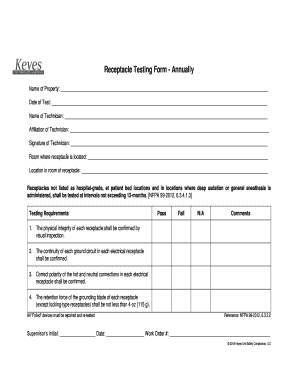
Receptacle Testing Form Annually Name of Property: Date of Test: Name of Technician: Affiliation of Technician: Signature of Technician: Room where receptacle is located: Location in room of receptacle:.

How it works

  1. Open form

    Open form follow the instructions

  2. Easily sign form

    Easily sign the form with your finger

  3. Share form

    Send filled & signed form or save

How to fill out the Hospital Receptacle Testing Form online

Filling out the Hospital Receptacle Testing Form online is an essential process for ensuring the safety and compliance of electrical receptacles in healthcare facilities. This guide provides a step-by-step approach to help users complete the form accurately and efficiently.

Follow the steps to accurately complete the Hospital Receptacle Testing Form online.

  1. Click ‘Get Form’ button to obtain the form and open it in the editor.
  2. Begin by entering the name of the property where the testing is being conducted in the designated field.
  3. Next, input the date of the test in the provided date field, ensuring it reflects the actual date testing took place.
  4. Enter the name of the technician who conducted the receptacle testing in the appropriate field.
  5. Document the affiliation of the technician by filling out the relevant section, indicating their professional association or organization.
  6. Ensure the technician's signature is added in the designated area to validate the completion of the testing.
  7. Specify the room where the receptacle is located by filling in the room designation.
  8. Detail the exact location of the receptacle within the room to provide clarity.
  9. Check the testing requirements for each receptacle checked, indicating whether they passed, failed, or if they are not applicable by selecting the appropriate box.
  10. In the comments section, provide any additional details or observations related to each receptacle as necessary.
  11. Finally, record the supervisor’s initial, date, and work order number in the respective fields to complete the document.
  12. Once all sections have been filled out completely, save any changes made, and choose to download, print, or share the form as needed.

Complete your Hospital Receptacle Testing Form online today for enhanced compliance and safety.

Get form

Experience a faster way to fill out and sign forms on the web. Access the most extensive library of templates available.
Get form

Related content

Receptacle Testing Form #1 - IN.gov
Receptacle Testing. Facility. Tester Name. Test Date. Receptacles not listed as...
Learn more
02receptacle_testing.pdf
Receptacle Testing. Objective: The objective of this experiment is to perform visual...
Learn more
Residual-current device - Wikipedia
A residual-current device (RCD), or residual-current circuit breaker (RCCB), is a safety...
Learn more

Related links form

Adams State University Group Project Grading Rubric Adrian College Athletic Training Physical Exam Form Adrian Elementary School Field Trip Permission Form AFAA Petition for Continuing Education Units

Questions & Answers

Get answers to your most pressing questions about US Legal Forms API.

Contact support

Hospital grade receptacles include the same markings that appear on general use receptacles, and also include “Hospital Grade” or “Hosp. Grade”, typically on the back of the receptacle where visible during installation.

A. Non-Hospital grade receptacles (normal & emergency powered) at patient bed locations & where deep sedation or general anesthesia is administered must be tested at intervals not exceeding 12 months.

These outlets are designed and tested to not only comply with general use requirements, but are held to higher performance standards including additional grounding reliability and increased assembly integrity, strength and durability. These outlets are much stronger than regular receptacles.

517.18(B) Patient Bed Location Receptacles. All receptacles, whether four or more, shall be listed “hospital grade” and so identified. The grounding terminal of each receptacle shall be connected to an insulated copper equipment grounding conductor sized in ance with Table 250.122.

The red outlets (sometimes referred to as sockets) in hospitals and medical facilities indicate that they are on emergency backup power. The bright red color helps nurses, doctors, and hospital staff quickly and clearly identify where to plug in critical equipment during an emergency situation.

The green dots indicate that the UPS outlets and plug are certified as hospital-grade and may be used within patient-care vicinities.

Hospital Grade Receptacles. In addition to complying with the general use requirements, hospital grade receptacles are specially designed and are subject to additional requirements of the standards. These include additional grounding reliability, assembly integrity, strength and durability.

Standard household electricity uses 120-volt 20-amp service, commonly called 110-volt. You can tell the type of electrical service to any receptacle outlet by the holes for a plug. A standard 110-volt plug has two rectangular holes, the left one slightly larger, with a hole below that has a rounded top.

Get This Form Now!

Use professional pre-built templates to fill in and sign documents online faster. Get access to thousands of forms.
Get form
If you believe that this page should be taken down, please follow our DMCA take down processhere.
Get Hospital Receptacle Testing Form
Get form
  • Adoption
  • Bankruptcy
  • Contractors
  • Divorce
  • Home Sales
  • Employment
  • Identity Theft
  • Incorporation
  • Landlord Tenant
  • Living Trust
  • Name Change
  • Personal Planning
  • Small Business
  • Wills & Estates
  • Packages A-Z
  • Affidavits
  • Bankruptcy
  • Bill of Sale
  • Corporate - LLC
  • Divorce
  • Employment
  • Identity Theft
  • Internet Technology
  • Landlord Tenant
  • Living Wills
  • Name Change
  • Power of Attorney
  • Real Estate
  • Small Estates
  • Wills
  • All Forms
  • Forms A-Z
  • Form Library
  • Legal Hub
  • About Us
  • Help Portal
  • Legal Resources
  • Blog
  • Affiliates
  • Contact Us
  • Delete My Account
  • Site Map
  • Industries
  • Forms in Spanish
  • Localized Forms
  • State-specific Forms
  • Forms Kit
  • Real Estate Handbook
  • All Guides
  • Notarize
  • Incorporation services
  • For Consumers
  • For Small Business
  • For Attorneys
  • USLegal
  • FormsPass
  • pdfFiller
  • signNow
  • altaFlow
  • DocHub
  • Instapage
Form Packages
  • Adoption
  • Bankruptcy
  • Contractors
  • Divorce
  • Home Sales
  • Employment
  • Identity Theft
  • Incorporation
  • Landlord Tenant
  • Living Trust
  • Name Change
  • Personal Planning
  • Small Business
  • Wills & Estates
  • Packages A-Z
Form Categories
  • Affidavits
  • Bankruptcy
  • Bill of Sale
  • Corporate - LLC
  • Divorce
  • Employment
  • Identity Theft
  • Internet Technology
  • Landlord Tenant
  • Living Wills
  • Name Change
  • Power of Attorney
  • Real Estate
  • Small Estates
  • Wills
  • All Forms
  • Forms A-Z
  • Form Library
Customer Service
  • Legal Hub
  • About Us
  • Help Portal
  • Legal Resources
  • Blog
  • Affiliates
  • Contact Us
  • Delete My Account
  • Site Map
  • Industries
  • Forms in Spanish
  • Localized Forms
  • State-specific Forms
  • Forms Kit
Legal Guides
  • Real Estate Handbook
  • All Guides
Prepared for you
  • Notarize
  • Incorporation services
Our Customers
  • For Consumers
  • For Small Business
  • For Attorneys
Our Sites
  • USLegal
  • FormsPass
  • pdfFiller
  • signNow
  • altaFlow
  • DocHub
  • Instapage
Social Media
Call us now toll free:
+1 833 426 79 33
As seen in:
© Copyright 1999-2026 airSlate Legal Forms, Inc. 3720 Flowood Dr, Flowood, Mississippi 39232
  • Your Privacy Choices
  • Terms of Service
  • Privacy Notice
  • Content Takedown Policy
  • Bug Bounty Program