Loading
Get Leaseback Form
How it works
-

Open form follow the instructions
-

Easily sign the form with your finger
-

Send filled & signed form or save
How to fill out the Leaseback Form online
Filling out the Leaseback Form online can streamline the process of managing real estate transactions. This guide provides clear, step-by-step guidance on how to complete each section, ensuring a smooth and efficient experience.
Follow the steps to complete the Leaseback Form accurately and efficiently.
- Click ‘Get Form’ button to obtain the Leaseback Form and open it in your preferred online editor.
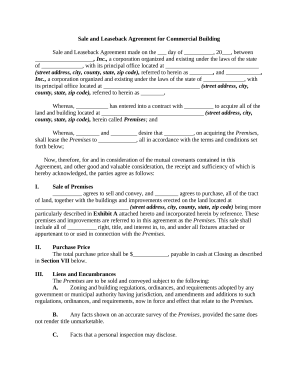
- Begin by entering the date of the agreement at the top of the form, where it states 'made on the ___ day of __________, 20___.' Ensure to fill in the correct month and year.
- Fill in the names of both corporations involved in the leaseback agreement, replacing '____________________, Inc.' and '______________, Inc.' with the proper legal names. Indicate their state of incorporation and principal office addresses.
- In the section titled 'Sale of Premises,' enter the street address, city, county, state, and zip code of the property being sold. This should align with the description provided in Exhibit A, which needs to be referenced.
- For the 'Purchase Price' section, clearly state the total amount that is being paid for the premises. Ensure this reflects accuracy for the closing.
- In the 'Liens and Encumbrances' section, acknowledge any applicable zoning regulations or conditions surrounding the premises. Use a checklist format if necessary for clarity.
- Complete the 'Title Insurance Policy' section by completing the designated amount that the title insurance will cover for the new owner.
- Fill in outstanding assessments, taxes, and any applicable conditions noted in the section regarding 'Outstanding Assessments, Taxes, Etc.' keeping in mind that any outstanding charges should be documented.
- In the 'Closing' section, provide the name and address of the title company or closing attorney facilitating the transaction. Confirm the chosen date and time for the closing meeting.
- For the 'Leaseback' section, ensure to indicate that upon closing, a lease agreement will commence, filling in details as required in Exhibit B, ensuring a smooth transition.
- Complete any additional fields such as 'Notices,' addressing how communication will occur between the parties involved.
- Finally, review all entries for accuracy and completeness before submitting. After ensuring all information is correct, you can save changes, download, print, or share the completed Leaseback Form.
Start completing your Leaseback Form online now and ensure your real estate transactions run smoothly.
In the typical sale-leaseback, a property owner sells real estate used in its business to an unrelated private investor or to an institutional investor. Simultaneously with the sale, the property is leased back to the seller for a mutually agreed-upon time period, usually 20 to 30 years.