Loading
Get World Book Online Scavenger Hunt
How it works
-

Open form follow the instructions
-

Easily sign the form with your finger
-

Send filled & signed form or save
How to fill out the World Book Online Scavenger Hunt online
This guide provides clear and detailed instructions on how to complete the World Book Online Scavenger Hunt. Follow these steps to effectively fill out the scavenger hunt form and explore a wealth of knowledge available online.
Follow the steps to successfully complete the scavenger hunt.
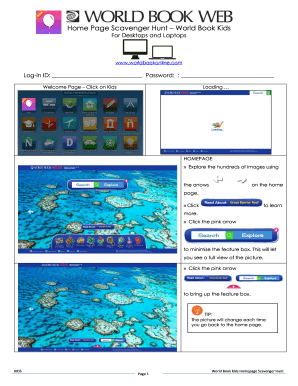
- Press the ‘Get Form’ button to access the scavenger hunt form and open it in a suitable editor.
- Log in using your unique ID and password. Ensure that you have entered the correct credentials to access the materials.
- On the welcome page, click on the 'Kids' section to navigate to the scavenger hunt content.
- Start exploring the homepage, using the arrows provided to view different images related to the scavenger hunt.
- Use the search box to input keywords relevant to your questions and view suggested articles. Click on the desired topic to gather information.
- As you read articles, use the navigation tips to dig deeper. Access different tabs for pictures, videos, or additional resources to enrich your responses.
- Complete the questions by filling in the answers based on the information you gather from the articles.
- After filling out the form, review your responses to ensure accuracy.
- Finally, save your changes, or download, print, or share the completed scavenger hunt form as needed.
Complete your scavenger hunt online now and discover a world of knowledge!
Virtual Scavenger Hunting Rules Create a list of items for the scavenger hunt. ... Assign a point to each item on the list. ... Decide on the length of the activity. ... Allow participants to share the items they collected with the team. ... Announce the winner/s.