Loading
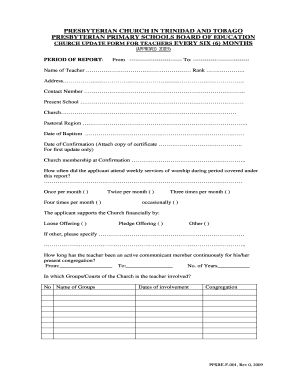
Get Presbyterian Primary School Board
How it works
-

Open form follow the instructions
-

Easily sign the form with your finger
-

Send filled & signed form or save
How to fill out the Presbyterian Primary School Board online
This guide aims to assist users in completing the Presbyterian Primary Schools Board Church Update Form for Teachers efficiently and accurately. By following these instructions, you will navigate the online form with ease, ensuring all necessary information is provided.
Follow the steps to complete the form successfully.
- Press the ‘Get Form’ button to access the form and open it for editing.
- Indicate the reporting period by filling in the 'From' and 'To' fields at the top of the form.
- Enter the full name of the teacher in the designated field, along with their rank.
- Provide the teacher's address and contact number clearly in the respective sections.
- Fill in the present school and church information in the specified fields.
- Complete the pastoral region details for the teacher's local church.
- Input the dates of baptism and confirmation along with attaching the confirmation certificate for the first update only.
- Report on church attendance during the covered period by checking the appropriate frequency option.
- Indicate how the applicant supports the church financially by selecting the suitable method (loose offering, pledge offering, or other). If 'other' is selected, please specify.
- Indicate how long the teacher has been an active communicant member of their current congregation, providing dates and total years.
- List the groups or courts of the church the teacher is involved with, including names and dates of involvement.
- Describe any additional ways the teacher supports the church.
- Highlight any leadership qualities the teacher has demonstrated in church or community settings during the reporting period.
- Add any general comments relevant to the report in the provided section.
- Ensure to have the signatures of relevant officials (local board secretary, chairman, session clerk, and the minister) along with the dates of their meetings.
- The teacher must add their signature in the designated space, confirming their review of the form.
- Once all sections are completed, save any changes, and then you may download, print, or share the form as needed.
Please complete the Presbyterian Primary Schools Board form online to ensure timely submission.
All children between the ages of 5 and 11 years old must attend primary education. Primary education is compulsory and takes place in a primary school. It is free of charge. All children aged between 11 and 16 years old must attend secondary education or training.
Industry-leading security and compliance
US Legal Forms protects your data by complying with industry-specific security standards.
-
In businnes since 199725+ years providing professional legal documents.
-
Accredited businessGuarantees that a business meets BBB accreditation standards in the US and Canada.
-
Secured by BraintreeValidated Level 1 PCI DSS compliant payment gateway that accepts most major credit and debit card brands from across the globe.