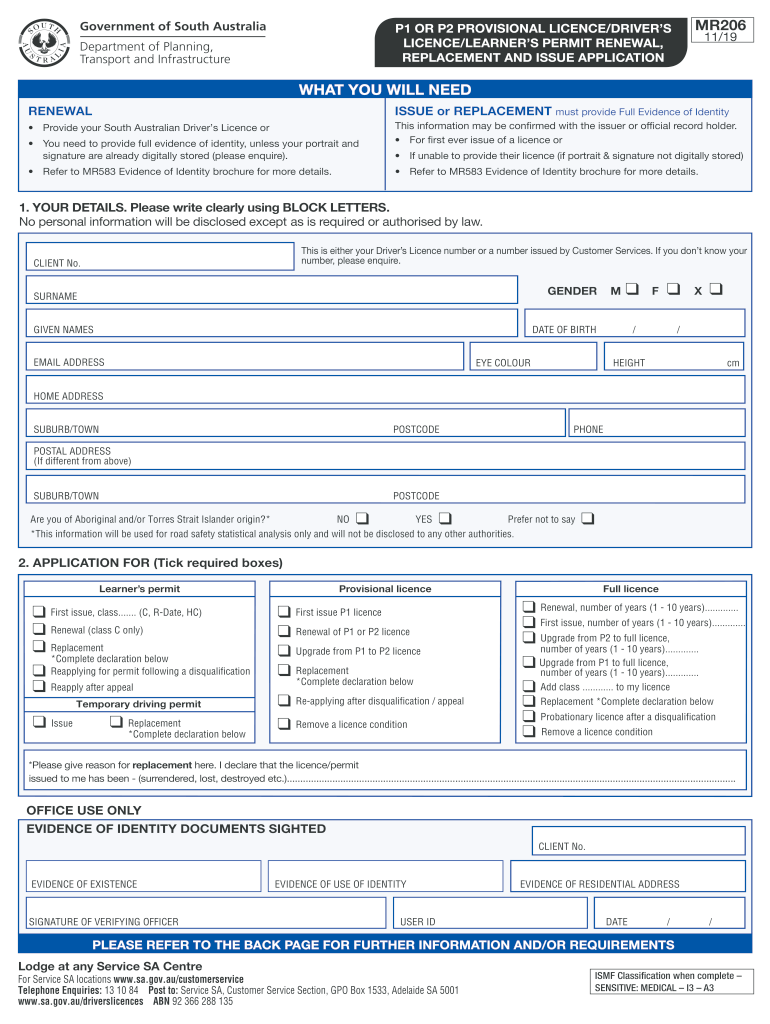
MR206 P1 OR P2 PROVISIONAL LICENCE/DRIVERS P1 OR P2 PROVISIONAL LICENCE/DRIVERS LICENCE/LEARNERS 11/19 LICENCE/LEARNERS PERMIT RENEWAL, PERMIT RENEWAL, REPLACEMENT AND ISSUE APPLICATION REPLACEMENT.
Loading

Open form follow the instructions

Easily sign the form with your finger

Send filled & signed form or save
How to use or fill out the Mr206 online
Filling out the Mr206 online for provisional licenses or learner's permits can seem complicated, but this guide will support you through each step. Follow these detailed instructions to complete your application accurately and ensure a smooth renewal or issue process.
Follow the steps to successfully fill out the Mr206 online.
- Click ‘Get Form’ button to obtain the form and open it in the online editor.
- In the 'Your Details' section, enter your personal information clearly using block letters. This will include your driver’s licence number, surname, given names, date of birth, and contact details such as your email address and phone number. Be sure to note if you identify as of Aboriginal and/or Torres Strait Islander origin for statistical purposes.
- Proceed to the 'Application For' section. Here, tick the appropriate boxes based on your requirements, whether you are applying for a provisional licence, learner's permit, renewal, replacement, or other options.
- Complete any necessary details regarding transport concession if applicable. If you hold a concession card, provide your concession number and ensure proper verification consent.
- Address any medical conditions or impairments that could affect your driving competence. Indicate whether you have any relevant medical issues or require corrective lenses when driving. Provide details as necessary.
- If you have been disqualified from holding a licence or been prevented from driving, ensure you disclose this information accurately.
- Input details regarding any other licences you currently hold or have held, either in another state or country.
- Optionally, indicate whether you are prepared to become an organ donor. If so, your preference will be recorded.
- Review the affirmation statement where you declare that all provided information is true and acknowledge the implications of providing false details. Sign and date the form.
- Once all sections are completed, save your changes to the form. You may then choose to download, print, or share the completed application as needed.
Start completing your Mr206 form online today to ensure your licence is renewed or issued promptly.
Experience a faster way to fill out and sign forms on the web. Access the most extensive library of templates available.
Related content
DESCRIPTION: Latitude 41°21'03", Longitude 80°12'23" NAD27 Mercer County, Pennsylvania...
MR 206 - Lab for MR 205. Credit Hours: 1. Laboratory applications for reporting health...
2('. mr 206. 21· ad 2C~. :22. qd 20~. 2.3- em 201. 24· au 211. 25· cpS. 26. ep 1. 201...
Get answers to your most pressing questions about US Legal Forms API.
How to go from P2 to full licence qld?
For an open licence If you were under 23 when you got your P1 licence, you must hold your P2 licence for at least two years to progress to an open licence. If you were 23 when you got your P1 licence, you must hold your P2 licence for at least one year to progress to an open licence.
How do I get a P2 Licence in SA?
P2 conditions for the remaining period of your provisional licence. If you're eligible your P1 licence will automatically be upgraded to a P2 licence when both of these apply: you're at least 18 years old. you've held a P1 licence for a minimum of 12 months.
When can you drive a v8 in SA?
High powered vehicle restrictions do not apply: if you are 25 years of age or older. if you have an exemption certificate. if you are under 25 and hold a full licence.
How many passengers can a P2 driver have in SA?
No more than one passenger aged 16-20 at any time of the day or night (immediate family members exempt), unless a qualified supervising driver is seated next to you or you meet the exemption criteria. This rule does NOT apply to P2 drivers or motorcyclists under 25 who hold a P2 licence or a full car licence.
How many points is a P2 SA?
You must not accumulate four or more demerit points during the provisional licence period.
Use professional pre-built templates to fill in and sign documents online faster. Get access to thousands of forms.
If you believe that this page should be taken down, please follow our DMCA take down process here.