Loading
Get Ok Section V – Attachments - Tulsa City 2020-2026
How it works
-

Open form follow the instructions
-

Easily sign the form with your finger
-

Send filled & signed form or save
How to fill out the OK Section V – Attachments - Tulsa City online
Filling out the OK Section V – Attachments form for Tulsa City is an essential part of your application process. This guide will provide you with clear, step-by-step instructions to ensure all necessary documents are included and appropriately labeled.
Follow the steps to successfully complete your attachments section.
- Click the ‘Get Form’ button to access the form and open it in your preferred editing tool.
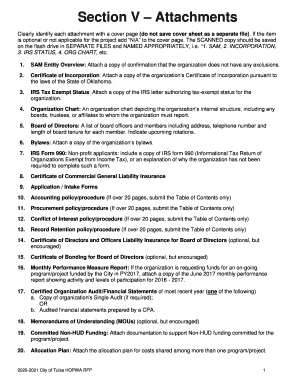
- Begin by reviewing the list of required attachments in the form. Each document needs to be clearly identified with a cover page, and if any item is optional or not applicable, mark it as 'N/A' on the cover page.
- Prepare your attachments by gathering scanned copies of all necessary documents and saving them in separate files. Use clear and appropriate file names such as '1. SAM,' '2. INCORPORATION,' or '3. IRS STATUS,' etc.
- For the SAM entity overview, ensure you include the confirmation that your organization has no exclusions.
- Attach a copy of the Certificate of Incorporation. This document must be compliant with the laws of the State of Oklahoma.
- Provide a copy of the IRS tax-exempt status letter for your organization to demonstrate its eligibility.
- Include an organization chart outlining the internal structure of your organization, indicating all boards and affiliates.
- Compile a list of board of directors, including names, addresses, phone numbers, and the tenure of each member while noting any upcoming rotations.
- Attach the organizational bylaws as a critical reference document.
- For non-profit applicants, provide a copy of IRS Form 990 or a brief explanation if not applicable.
- Collect any optional documents, such as the certificate of directors and officers liability insurance, or committed non-HUD funding documentation as encouraged.
- Once all attachments are collected and prepared, review for completeness and accuracy before saving the changes.
- Finally, you can save the completed form, download it, print it, or share it as needed for submission.
Ensure all your documents are prepared and file your form online today for a smoother application process.