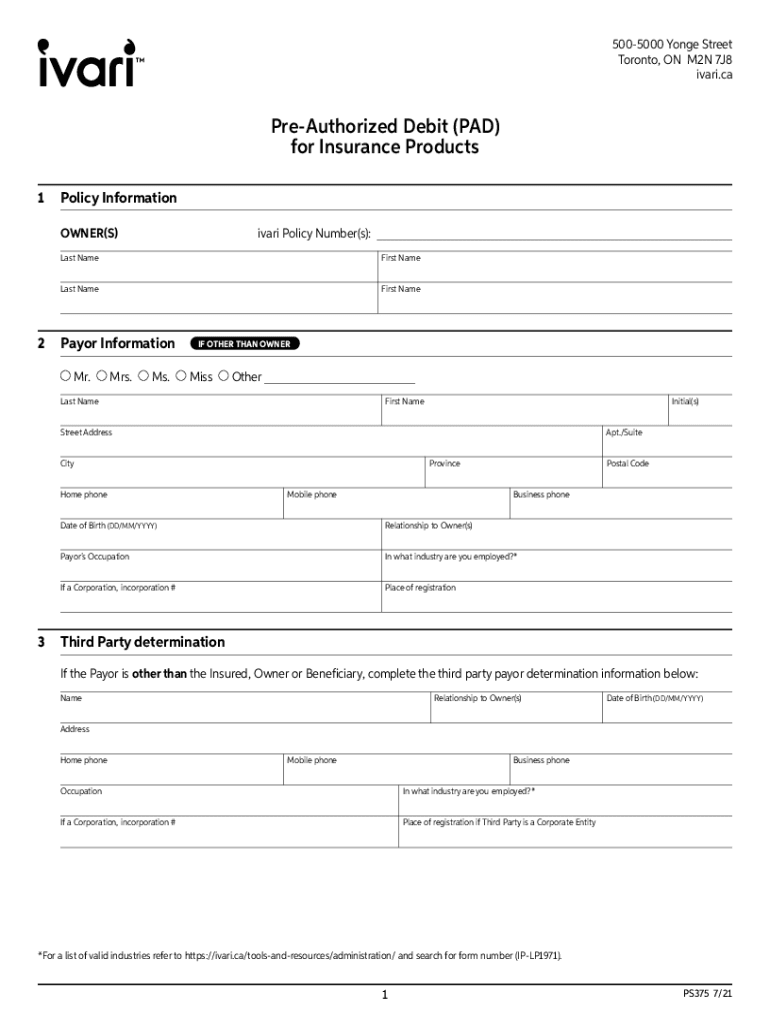
5005000 Yonge Street Toronto, ON M2N 7J8 ivari.caPreAuthorized Debit (PAD) for Insurance Products 1Policy Information OWNER(S)ivari Policy Number(s):Last NameFirst NameLast NameFirst Name2Payor Information Mr.Mrs.Ms.IF.
Loading

Open form follow the instructions

Easily sign the form with your finger

Send filled & signed form or save
How to fill out the Canada Ivari PS375 online
Filling out the Canada Ivari PS375 form online can be a straightforward process when guided properly. This document is essential for setting up Pre-Authorized Debit (PAD) for insurance products with Ivari. Follow this comprehensive guide to ensure accuracy and completeness.
Follow the steps to fill out the Canada Ivari PS375 form accurately.
- Click the ‘Get Form’ button to access the Canada Ivari PS375 form electronically. This will open the document in the online editor.
- In the 'Policy Information' section, enter the ivari policy number(s) along with the last and first names of all owners. Make sure to check for any errors before proceeding.
- Next, fill in the 'Payor Information.' If the payor differs from the owner(s), indicate the title (Mr., Mrs., Ms., etc.) and provide their last name, first name, initials, address, phone numbers, date of birth, and occupation.
- If applicable, complete the 'Third Party determination' section. This is required if the payor is different from the insured, owner, or beneficiary. Enter their name, relationship to the owner(s), date of birth, and relevant contact information.
- Proceed to the 'PAD Withdrawal Information' section. Here, indicate if you are establishing a new PAD account or using an existing one. Attach a personalized pre-printed void cheque if establishing a new account. Also, specify the preferred withdrawal date and the total amount.
- In the 'Frequency' subsection, select how often you would like the withdrawals to occur — monthly, quarterly, semi-annually, or annually, and note that not all plans may allow semi-annual options.
- Review the 'Acknowledgement/Authorization' section carefully. Make sure you understand the terms regarding automatic withdrawals, the rights to cancel, and when refunds would be processed.
- Finally, sign and date the form in the designated fields for all owners and the payor. Ensure that all signatures are clear and that the dates are accurate.
- After completing all sections, you can save or download the form. You also have the option to print it for your records or share it as needed.
Complete your Canada Ivari PS375 form online today for a seamless experience.
Experience a faster way to fill out and sign forms on the web. Access the most extensive library of templates available.
Get answers to your most pressing questions about US Legal Forms API.
Who is the new owner of ivari?
Barbados-based Sagicor Financial Company Ltd. is acquiring Toronto-based life insurer Ivari for $325 million, the firms announced on Thursday. The acquisition, which is subject to regulatory approvals, is expected to close in 2023.
How do I withdraw from Ivari life insurance?
A withdrawal can be requested by completing sections 1 , 5(a) & 7 of the Policy Service form and signing on page 4. Please be advised that a withdrawal against your universal life policy may cause the policy to lapse if it is not adequately funded. As well, this transaction may cause a taxable consequence.
How to use cash value life insurance?
Depending on the type of life insurance policy you have, here are four ways you may be able to access its cash value: Make a withdrawal. Take out a loan. Surrender the policy. Use cash value to help pay premiums.
What is the grace period for ivari?
Currently, all policies allow clients a 31-day grace period for premium payments. Under this program, we are extending the grace period to allow policy owners to request a premium deferral of up to 91 days if they are experiencing financial hardship as a direct result of COVID-19 and related to: Illness.
How do I change my beneficiary in ivari?
Online change form. For Change of Beneficiary forms, only the following provinces accept eSignatures: BC, MB, NB, ON, AB, NL and QC. For clients residing in all other provinces, please download the Change of Beneficiary form, sign, and send to ivari using our secure online Send Documents tool. Selection is required.
Can I cancel Ivari insurance?
If you would like to cancel your insurance policy with ivari, and the policy has no cash value, please submit a letter of direction including the policy owner(s) and insured(s) names, plus a policy number. All policy owners must sign and, if applicable, irrevocable beneficiaries must also sign.
How do I change my address with ivari?
How do I update my address, email or telephone number? You can complete and submit online. NEW You can call us directly at 1-800-846-5970. You can complete the Contact Information Change form. If you prefer, you can submit a letter of direction which can be mailed to us at:
How do I change my name in Ivari?
You can change or correct the name on your policy by completing sections 1& 10 of the Policy Service form and signing on page 4. Note: A copy of the name change documentation must be submitted. For Corporations: Please attach articles of amalgamation/amendment showing the correct legal name.
Can you pull money from your life insurance?
If you have a permanent life insurance policy, then yes, you can take cash out before your death.
How do I find the cash value of my life insurance policy?
The value of your life insurance refers to the death benefit paid to beneficiaries. To find the cash value of your life insurance, calculate your total payments and subtract surrender fees. Remember, the value for a sale will be lower than the death benefit to allow the buyer to profit.
Use professional pre-built templates to fill in and sign documents online faster. Get access to thousands of forms.
If you believe that this page should be taken down, please follow our DMCA take down process here.