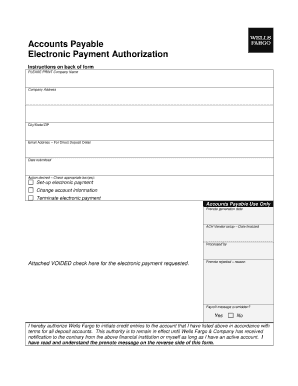
Get Wells Fargo Accounts Payable Electronic Payment Authorization
How it works
-

Open form follow the instructions
-

Easily sign the form with your finger
-

Send filled & signed form or save
How to fill out the Wells Fargo Accounts Payable Electronic Payment Authorization online
Filling out the Wells Fargo Accounts Payable Electronic Payment Authorization form online can streamline the payment process for your organization. This guide will provide you with clear instructions on completing each section of the form, ensuring you provide all necessary information accurately and efficiently.
Follow the steps to complete the authorization form correctly.
- Click the ‘Get Form’ button to obtain the form and open it for editing.
- Begin by entering your company's legal name in the designated field. Make sure to match it exactly as it appears in official documents.
- In the next section, provide the corresponding Tax Identification Number (TIN) for your company. This number is critical for processing payments.
- Fill in the contact information for the person responsible for accounts payable. This should include their name, email address, and phone number for any follow-up queries.
- Next, indicate the preferred payment methods for your invoices. Clearly check the boxes for options such as ACH transfers or direct deposits to ensure preferred processing.
- Carefully review your entries for accuracy. It is essential that all details are precise to avoid payment delays.
- Once you have completed the form, you can save changes, download a copy for your records, print the document, or share it as needed.
Complete your Wells Fargo Accounts Payable Electronic Payment Authorization form online today to enhance your payment processing efficiency.
Yes, Wells Fargo is fully ACH enabled, allowing customers to execute electronic transfers and manage payments with ease. By implementing Wells Fargo Accounts Payable Electronic Payment Authorization, you can ensure timely payments and reduce the risks often associated with manual processing. This functionality provides businesses with a dependable way to enhance financial operations. Utilizing this feature can significantly improve your efficiency in handling payments.