Loading
Form preview
  • US Legal Forms
  • Form Library
  • More Forms
  • More Multi-State Forms
  • Ijd Inspections Ltd

Get Ijd Inspections Ltd

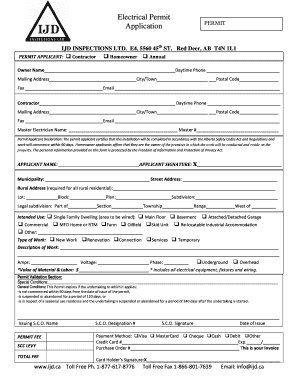
Electrical Permit Application PERMIT ID INSPECTIONS LTD. E4, 5560 45th ST. Red Deer, AB T4N 1L1 PERMIT APPLICANT: Contractor Homeowner Annual Owner Name Daytime Phone Mailing Address City/Town Postal.

How it works

  1. Open form

    Open form follow the instructions

  2. Easily sign form

    Easily sign the form with your finger

  3. Share form

    Send filled & signed form or save

How to fill out the IJD INSPECTIONS LTD online

Filling out the IJD INSPECTIONS LTD form is a straightforward process designed to facilitate the electrical permit application. This guide provides clear, step-by-step instructions to help ensure that your form is completed accurately and efficiently.

Follow the steps to complete your electrical permit application

  1. Select the ‘Get Form’ button to access the form electronically and open it for editing.
  2. In the permit applicant section, choose your role by marking the appropriate checkbox: contractor, homeowner, or annual. Then, fill in your name, daytime phone number, and mailing address, including city/town and postal code.
  3. If applicable, provide your contractor details, including their name, daytime phone number, and mailing address. Ensure all contact information is complete.
  4. Enter the name and master number of the master electrician responsible for the work, if applicable.
  5. Review and confirm the permit applicant declaration, ensuring you understand your responsibilities as outlined.
  6. Complete the municipality and street address fields accurately. If applicable, provide the rural address, lot, block, plan, and subdivision details.
  7. Indicate the intended use of the electrical work by checking the relevant options (e.g., single-family dwelling, commercial). Specify the area to be wired, as needed.
  8. Select the type of work being performed, such as new work or renovation.
  9. Provide a detailed description of the electrical work to be conducted, ensuring clarity and completeness.
  10. Fill in the technical specifications, including the amp rating, voltage, and phase. Specify if the work will be underground or overhead.
  11. Input the total value of materials and labor associated with the project, ensuring this includes all electrical components.
  12. Review the permit validation section for any special conditions that may apply to your project.
  13. Fill out the information for permit fee and payment method, providing necessary details such as credit card number or cheque information.
  14. Sign the application by writing your name in the applicant name and signing in the applicant signature section.
  15. After completing the form, ensure all fields are correctly filled before saving your changes, downloading, printing, or sharing the application as needed.

Complete your electrical permit application online today to ensure a smooth approval process.

Get form

Experience a faster way to fill out and sign forms on the web. Access the most extensive library of templates available.
Get form

Related content

Cal/OSHA Elevator Certification - California...
Certifies the competency of limited and general elevator mechanics, temporary mechanics...
Learn more
The Need for Liability Constraints in Successful...
by TJ Daemen · 1993 · Cited by 4 — 3 4 Inspection efforts are limited, however, to...
Learn more
Food and Drug Administration - Wikipedia
The FDA regulates most products with a set of published standards enforced by a modest...
Learn more

Related links form

FR Rendita 126436 Form 2020 FR Rendita 126436 Form 2012 Frank and Bill's Auto Collision Center Authorization to Release Vehicle Franklin Academy Gobble Gram

Questions & Answers

Get answers to your most pressing questions about US Legal Forms API.

Contact support

Under the Alberta Safety Codes Act and Permit Regulations an Electrical Permit is required to , alter or add to an electrical system.

Examples of projects that require a building permit: new buildings or structures. retaining walls over 1.2 meters in height. swimming pools or hot tubs. demolitions. relocations. repairs or alterations to existing buildings and structures. change of occupancy or use of a space.

Permits are NOT required for maintenance or minor cosmetic upgrades such as: Replacing flooring, painting, installing kitchen cabinets. Replacing roof shingles. Replacing windows of the same size.

Permits are part of a process to access compliance to a minimum standard of construction safety for the benefit of all Albertans. If construction projects are undertaken without required permits, the owner may be subject to penalties and extra costs incurred to bring a project into compliance.

The permits require will include both the Edmonton Development and Building Permits. When developing a basement for own use or for rental purpose such as a secondary suite and not applying for the permits, the penalty for finishing basement without permit will be doubled of the original permit fees.

Get This Form Now!

Use professional pre-built templates to fill in and sign documents online faster. Get access to thousands of forms.
Get form
If you believe that this page should be taken down, please follow our DMCA take down processhere.

Industry-leading security and compliance

US Legal Forms protects your data by complying with industry-specific security standards.
  • In businnes since 1997
    25+ years providing professional legal documents.
  • Accredited business
    Guarantees that a business meets BBB accreditation standards in the US and Canada.
  • Secured by Braintree
    Validated Level 1 PCI DSS compliant payment gateway that accepts most major credit and debit card brands from across the globe.
Get IJD INSPECTIONS LTD
Get form
  • Adoption
  • Bankruptcy
  • Contractors
  • Divorce
  • Home Sales
  • Employment
  • Identity Theft
  • Incorporation
  • Landlord Tenant
  • Living Trust
  • Name Change
  • Personal Planning
  • Small Business
  • Wills & Estates
  • Packages A-Z
  • Affidavits
  • Bankruptcy
  • Bill of Sale
  • Corporate - LLC
  • Divorce
  • Employment
  • Identity Theft
  • Internet Technology
  • Landlord Tenant
  • Living Wills
  • Name Change
  • Power of Attorney
  • Real Estate
  • Small Estates
  • Wills
  • All Forms
  • Forms A-Z
  • Form Library
  • Legal Hub
  • About Us
  • Help Portal
  • Legal Resources
  • Blog
  • Affiliates
  • Contact Us
  • Delete My Account
  • Site Map
  • Industries
  • Forms in Spanish
  • Localized Forms
  • State-specific Forms
  • Forms Kit
  • Real Estate Handbook
  • All Guides
  • Notarize
  • Incorporation services
  • For Consumers
  • For Small Business
  • For Attorneys
  • USLegal
  • FormsPass
  • pdfFiller
  • signNow
  • altaFlow
  • DocHub
  • Instapage
Form Packages
  • Adoption
  • Bankruptcy
  • Contractors
  • Divorce
  • Home Sales
  • Employment
  • Identity Theft
  • Incorporation
  • Landlord Tenant
  • Living Trust
  • Name Change
  • Personal Planning
  • Small Business
  • Wills & Estates
  • Packages A-Z
Form Categories
  • Affidavits
  • Bankruptcy
  • Bill of Sale
  • Corporate - LLC
  • Divorce
  • Employment
  • Identity Theft
  • Internet Technology
  • Landlord Tenant
  • Living Wills
  • Name Change
  • Power of Attorney
  • Real Estate
  • Small Estates
  • Wills
  • All Forms
  • Forms A-Z
  • Form Library
Customer Service
  • Legal Hub
  • About Us
  • Help Portal
  • Legal Resources
  • Blog
  • Affiliates
  • Contact Us
  • Delete My Account
  • Site Map
  • Industries
  • Forms in Spanish
  • Localized Forms
  • State-specific Forms
  • Forms Kit
Legal Guides
  • Real Estate Handbook
  • All Guides
Prepared for you
  • Notarize
  • Incorporation services
Our Customers
  • For Consumers
  • For Small Business
  • For Attorneys
Our Sites
  • USLegal
  • FormsPass
  • pdfFiller
  • signNow
  • altaFlow
  • DocHub
  • Instapage
Social Media
Call us now toll free:
+1 833 426 79 33
As seen in:
© Copyright 1999-2026 airSlate Legal Forms, Inc. 3720 Flowood Dr, Flowood, Mississippi 39232
  • Your Privacy Choices
  • Terms of Service
  • Privacy Notice
  • Content Takedown Policy
  • Bug Bounty Program