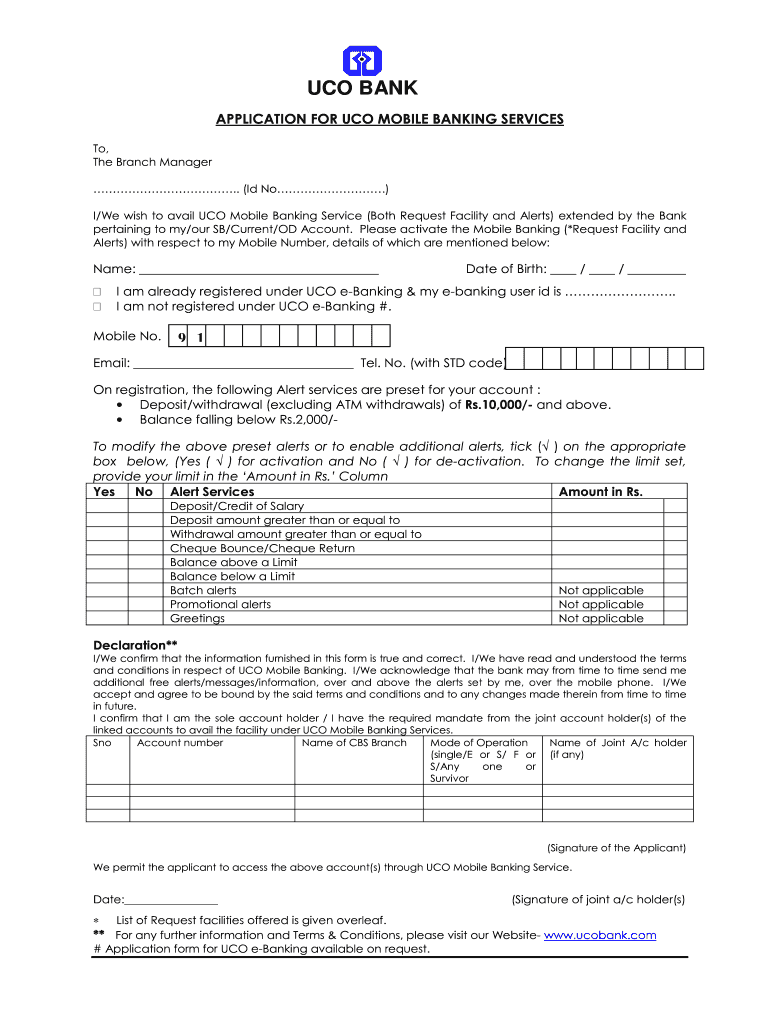
) I/We wish to avail UCO Mobile Banking Service (Both Request Facility and Alerts) extended by the Bank pertaining to my/our SB/Current/OD Account. Please activate the Mobile Banking (*Request Facility and Alerts) with respect to my Mobile Number, details of which are mentioned below: Name: _____________________________________ Date of Birth: ____ / ____ / _________ I am already registered under UCO e-Banking & my e-banking user id is …………………….. I am not registered under UCO e.
Loading

Open form follow the instructions

Easily sign the form with your finger

Send filled & signed form or save
How to fill out the UCO Bank Application for UCO Mobile Banking Services online
Filling out the UCO Bank Application for UCO Mobile Banking Services online can enhance your banking experience by providing quick and easy access to your account. This guide will walk you through each section of the application to ensure you submit your form accurately and efficiently.
Follow the steps to complete your application accurately.
- Click ‘Get Form’ button to obtain the form and open it for editing.
- Begin by entering your name in the designated field. Ensure that it matches the name on your bank account.
- Provide your date of birth by filling it in the format of day, month, and year (DD/MM/YYYY). This information is essential for identity verification.
- Indicate if you are already registered for UCO e-Banking by checking the appropriate box; fill in your e-banking user ID if applicable.
- Enter your mobile number, ensuring it's active as alerts and notifications will be sent to this number.
- Input your email address and telephone number with the appropriate STD code for further communication.
- Review the preset alert services selected by the bank and modify them by ticking the ‘Yes’ or ‘No’ boxes for alert activation or deactivation. Include your preferred amounts where applicable.
- Read and acknowledge the declaration section. Check the confirmation statement regarding the accuracy of the provided information and your acceptance of the bank’s terms and conditions.
- If applicable, list your account numbers and other requested information for each linked account, including the mode of operation and details about any joint account holders.
- Sign the application to confirm your intent and understanding before submitting the form.
- Once all sections are complete, save your changes. You may then download, print, or share the form as needed.
Start filling out your UCO Bank Application for UCO Mobile Banking Services online today!
Experience a faster way to fill out and sign forms on the web. Access the most extensive library of templates available.
Related content
The Uniform System of Financial Records (USFR) has been developed by the Office of the...
Enter your bank's routing and your account number to pay from your checking or savings...
Jul 22, 2025 — Banka Power Project is a cancelled power station in Siriya, Banka, Bihar...
Get answers to your most pressing questions about US Legal Forms API.
How can I activate mobile banking service?
You can activate the mobile banking service by downloading the UCO Bank Application for UCO Mobile Banking Services. Follow the installation prompts to set up your account. This service allows you to conduct banking tasks quickly, giving you greater flexibility and control over your finances.
How to register for UCO Bank mobile banking?
Registering for UCO Bank mobile banking is user-friendly. Download the UCO Bank Application for UCO Mobile Banking Services and start the registration process by entering your account information. After verifying your details, you'll gain secure access to manage your banking activities from your device.
How to activate access mobile banking?
To activate access to mobile banking, you first need to obtain the UCO Bank Application for UCO Mobile Banking Services from the app store. After installation, sign in using your account credentials and follow any prompts for verification. Once completed, your mobile banking will be accessible for all transactions.
How is mobile banking activated?
Mobile banking activation occurs through a straightforward process. Download the UCO Bank Application for UCO Mobile Banking Services, then provide your account details to initiate the activation. The app will guide you through verification steps, enabling you to access features easily.
How can I create mobile banking?
To create mobile banking, start by downloading the UCO Bank Application for UCO Mobile Banking Services. Create an account using your registered phone number and follow the instructions to verify your identity. This step-by-step guide ensures that you gain secure access to your banking services.
How do I activate my mobile banking security bank?
Activating your mobile banking security is crucial for online transactions. After downloading the UCO Bank Application for UCO Mobile Banking Services, navigate to the security settings in the app. Set up your preferred password or biometric identification to secure your banking experience.
How to activate mobile banking from home?
To activate mobile banking from home, you need to download the UCO Bank Application for UCO Mobile Banking Services. Once installed, follow the on-screen prompts to create your account and link your existing bank details. This convenient process allows you to manage your finances without a visit to the bank.
How do I register for UCO mobile banking?
Registering for UCO mobile banking involves a few straightforward steps. Visit the UCO Bank official site and click on the UCO Bank Application for UCO Mobile Banking Services. Fill in the necessary details about your account, and you will receive confirmation that your registration is complete.
Can I register mobile banking online?
Yes, you can easily register for mobile banking online. To do this, simply visit the UCO Bank website and navigate to the UCO Bank Application for UCO Mobile Banking Services section. Follow the prompts, provide the necessary details, and you will be set up in no time.
How can I activate my Access Bank mobile app?
You can activate your Access Bank mobile app by downloading it from the app store. Once downloaded, open the app and enter your banking credentials to log in. If you are new to the app, follow the registration process provided. Similar to other banking apps like the UCO Bank Application for UCO Mobile Banking Services, it ensures that your banking experience is secure and convenient.
Use professional pre-built templates to fill in and sign documents online faster. Get access to thousands of forms.
If you believe that this page should be taken down, please follow our DMCA take down process here.