Loading
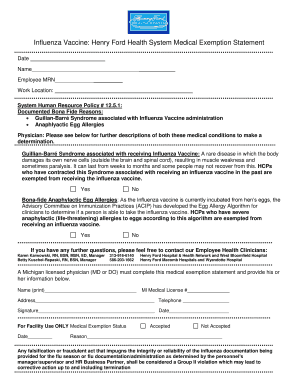
Get Hfhs Flu Medical Exemption Form - Early College
How it works
-

Open form follow the instructions
-

Easily sign the form with your finger
-

Send filled & signed form or save
How to fill out the HFHS Flu Medical Exemption Form - Early College online
Filling out the HFHS Flu Medical Exemption Form - Early College online is a straightforward process designed to assist individuals requiring a medical exemption from the influenza vaccine. This guide will provide clear and supportive instructions to help you accurately complete the form while ensuring that all necessary information is provided.
Follow the steps to fill out the HFHS Flu Medical Exemption Form online.
- Click ‘Get Form’ button to obtain the form and open it in the editor.
- Begin by entering your personal information in the designated fields. This includes your name, employee MRN, and work location.
- Review the documented bona fide reasons listed on the form, which include conditions such as Guillain-Barré Syndrome and anaphylactic egg allergies. Carefully assess whether any of these apply to you.
- For each medical condition listed, indicate your status by selecting 'Yes' or 'No'. Make sure to answer truthfully to ensure accurate consideration of your exemption.
- Complete the section for the Michigan licensed physician who will verify your medical exemption. This includes their name, medical license number, address, and phone number.
- Ensure that the physician provides their signature and date on the form to authenticate the exemption request.
- Finally, save your changes, and review the form for accuracy. You may then choose to download, print, or share the completed form as needed.
Complete your HFHS Flu Medical Exemption Form online today.