Loading
Form preview
  • US Legal Forms
  • Other Templates
  • More Forms
  • More Multi-State Forms
  • Personal Financial Statement (pdf) - Bank First National

Get Personal Financial Statement (pdf) - Bank First National

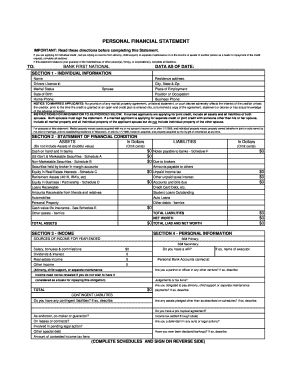
PERSONAL FINANCIAL STATEMENT IMPORTANT: Read these directions before completing this Statement. If you are applying for individual credit , but are relying on income from alimony, child support, or.

How it works

  1. Open form

    Open form follow the instructions

  2. Easily sign form

    Easily sign the form with your finger

  3. Share form

    Send filled & signed form or save

How to fill out the Personal Financial Statement (PDF) - Bank First National online

Completing the Personal Financial Statement is a crucial step for anyone applying for credit or partnership opportunities. This guide provides clear and concise instructions to help users accurately fill out the document online.

Follow the steps to efficiently complete your Personal Financial Statement

  1. Press the ‘Get Form’ button to access the Personal Financial Statement. This will allow you to obtain the form and open it in your document editor.
  2. In Section 1, provide your individual information. Fill in your full name, residence address, driver's license number, marital status, spouse's name (if applicable), place of employment, date of birth, position or occupation, and contact numbers.
  3. Review the instructions for married applicants carefully. If applying for joint credit, ensure that you include all assets and liabilities of both spouses and obtain both signatures.
  4. Move to Section 2 to outline your financial condition. Accurately list your assets and liabilities in the specified fields. Make sure to omit cents and focus on whole dollar amounts.
  5. In Section 3, document your income sources for the year. Clearly indicate your salary, bonuses, dividends, and any other income. If relevant, include any alimony or child support.
  6. Provide the necessary information in Section 4 regarding personal details, including whether you have a will, judgments, alimony obligations, or contingent liabilities.
  7. Complete the additional schedules included in the document to provide detailed information about your securities, real estate interests, business equity, life insurance, and any loans obtained.
  8. Once all sections and schedules are filled out completely, review the document for accuracy. Ensure that all presented information is correct and up-to-date.
  9. Finally, save the changes to your document. You can choose to download, print, or share the completed Personal Financial Statement as required.

Take the next step in your financial journey by completing your Personal Financial Statement online today.

Get form

Experience a faster way to fill out and sign forms on the web. Access the most extensive library of templates available.
Get form

Related content

First National Bancshares, Inc. - SEC.gov
The Bank's principal office is located at 5817 Manatee Avenue West, Bradenton, Florida...
Learn more
01/31/2018 PERSONAL FINANCIAL STATEMENT 7(a) / 504...
SBA uses the information required by this Form 413 as one of a number of data sources in...
Learn more
Finance - Wikipedia
Finance is a term for matters regarding the management, creation, and study of money and...
Learn more

Related links form

GU BES 09-12 2009 HI DHS 1100B-2 2005 HI EPI 12A 2006 HI HCAP 101A 2011

Questions & Answers

Get answers to your most pressing questions about US Legal Forms API.

Contact support

A personal financial statement is a snapshot of your personal financial position at a specific point in time. It lists your assets (what you own), your liabilities (what you owe), and your net worth. To get your net worth, subtract liabilities from assets.

How to set up a personal net worth statement. List your assets (what you own), estimate the value of each, and add up the total. Include items such as: ... List your liabilities (what you owe) and add up the outstanding balances. ... Subtract your liabilities from your assets to determine your personal net worth.

A personal financial statement is a snapshot of your personal financial position at a specific point in time. It lists your assets (what you own), your liabilities (what you owe), and your net worth. To get your net worth, subtract liabilities from assets.

How To Fill Out the Personal Financial Statement Step 1: Choose The Appropriate Program. ... Step 2: Fill In Your Personal Information. ... Step 3: Write Down Your Assets. ... Step 4: Write Down Your Liabilities. ... Step 5: Fill Out the Notes Payable to Banks and Others Section. ... Step 6: Fill Out the Stocks and Bonds Section.

To create a personal financial statement, follow these simple steps: Create a spreadsheet that has a section for assets and one for liabilities. ... List your assets and their worth. ... List every liability as well as its worth. ... Determine the total of both assets and liabilities. ... Determine your net worth.

A personal financial statement is a spreadsheet that details the assets and liabilities of an individual, couple, or business at a specific point in time. Typically, the spreadsheet consists of two columns, with assets listed on the left and liabilities on the right.

Before extending a loan to a borrower, banks consider all major financial statements of a company. The balance sheet, the income statement and the statement of cash flow are all studied carefully by the bank's loan office to assess the company's ability to repay the loan.

Get This Form Now!

Use professional pre-built templates to fill in and sign documents online faster. Get access to thousands of forms.
Get form
If you believe that this page should be taken down, please follow our DMCA take down processhere.
Get Personal Financial Statement (PDF) - Bank First National
Get form
  • Adoption
  • Bankruptcy
  • Contractors
  • Divorce
  • Home Sales
  • Employment
  • Identity Theft
  • Incorporation
  • Landlord Tenant
  • Living Trust
  • Name Change
  • Personal Planning
  • Small Business
  • Wills & Estates
  • Packages A-Z
  • Affidavits
  • Bankruptcy
  • Bill of Sale
  • Corporate - LLC
  • Divorce
  • Employment
  • Identity Theft
  • Internet Technology
  • Landlord Tenant
  • Living Wills
  • Name Change
  • Power of Attorney
  • Real Estate
  • Small Estates
  • Wills
  • All Forms
  • Forms A-Z
  • Other Templates
  • Legal Hub
  • About Us
  • Help Portal
  • Legal Resources
  • Blog
  • Affiliates
  • Contact Us
  • Delete My Account
  • Site Map
  • Industries
  • Forms in Spanish
  • Localized Forms
  • State-specific Forms
  • Forms Kit
  • Real Estate Handbook
  • All Guides
  • Notarize
  • Incorporation services
  • For Consumers
  • For Small Business
  • For Attorneys
  • USLegal
  • FormsPass
  • pdfFiller
  • signNow
  • altaFlow
  • DocHub
  • Instapage
Form Packages
  • Adoption
  • Bankruptcy
  • Contractors
  • Divorce
  • Home Sales
  • Employment
  • Identity Theft
  • Incorporation
  • Landlord Tenant
  • Living Trust
  • Name Change
  • Personal Planning
  • Small Business
  • Wills & Estates
  • Packages A-Z
Form Categories
  • Affidavits
  • Bankruptcy
  • Bill of Sale
  • Corporate - LLC
  • Divorce
  • Employment
  • Identity Theft
  • Internet Technology
  • Landlord Tenant
  • Living Wills
  • Name Change
  • Power of Attorney
  • Real Estate
  • Small Estates
  • Wills
  • All Forms
  • Forms A-Z
  • Other Templates
Customer Service
  • Legal Hub
  • About Us
  • Help Portal
  • Legal Resources
  • Blog
  • Affiliates
  • Contact Us
  • Delete My Account
  • Site Map
  • Industries
  • Forms in Spanish
  • Localized Forms
  • State-specific Forms
  • Forms Kit
Legal Guides
  • Real Estate Handbook
  • All Guides
Prepared for you
  • Notarize
  • Incorporation services
Our Customers
  • For Consumers
  • For Small Business
  • For Attorneys
Our Sites
  • USLegal
  • FormsPass
  • pdfFiller
  • signNow
  • altaFlow
  • DocHub
  • Instapage
Social Media
Call us now toll free:
+1 833 426 79 33
As seen in:
© Copyright 1999-2026 airSlate Legal Forms, Inc. 17 Station Street, Ste. 203, Brookline, MA 02445
  • Your Privacy Choices
  • Terms of Service
  • Privacy Notice
  • Content Takedown Policy
  • Bug Bounty Program