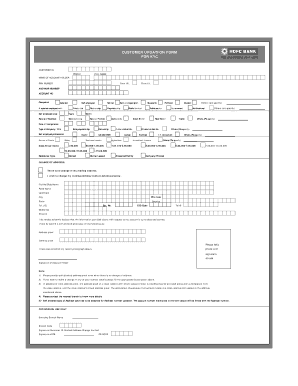
UMBER* ACCOUNT NO Occupation Salaried Self employed If salaried employed with Private Ltd Self employed since Years Nature of Business Manufacturing Retired Partnership Self-employed prof. Proprietorship Housewife Public Limited Politician Public sector Others (pls specify) Student Government Others (pls specify) Multinational Month Service Provider Agriculture Stock Broker Real Estate Trader Others.(Pls specify) Date of Incorporation Type of Company / Firm Sole pro.
Open form follow the instructions
Easily sign the form with your finger
Send filled & signed form or save
How to fill out the HDFC Bank Customer Updation Form for KYC online
The HDFC Bank Customer Updation Form for KYC plays a vital role in maintaining up-to-date information for account holders. This guide will assist users in accurately completing the form online, ensuring compliance with KYC norms.
Follow the steps to complete the HDFC Bank Customer Updation Form for KYC online.
- Click ‘Get Form’ button to obtain the form and open it in your preferred document editor.
- In the form, begin with entering your Customer ID. This unique identifier helps in accessing your bank records.
- Provide your PAN number, which is essential for tax identification purposes.
- State your Account Number to facilitate accurate processing of your request.
- Indicate your nature of business or employment, if applicable, and fill in the service provider details if relevant.
- If there is a change in your mailing address, fill in the details provided for Flat No/Bldg Name, Road Name, Landmark, City, PIN Code, State, and Country. Otherwise, select 'There is no change in my mailing address.'
- Input your contact information including telephone numbers, mobile number, and email ID accurately.
- Attach self-attested copies of your Address Proof and Identity Proof, as detailed in the instructions. Make sure your recent photograph is affixed where indicated.
Complete your KYC updates online to ensure your account remains compliant and up-to-date.
Experience a faster way to fill out and sign forms on the web. Access the most extensive library of templates available.
Related content
Customers can access their accounts from any of the HDFC Bank ATMs or non-HDFC Bank ATMs...
You'll typically need to submit a written request or fill out a form specifying why you...
Nov 25, 2020 — Updation of KYC details: It is requested to update Permanent Account...
Get answers to your most pressing questions about US Legal Forms API.
How do I update my KYC online?
To update your KYC online, simply log into your HDFC Bank account and access the HDFC Bank Customer Updation Form for KYC. Fill out the form with your updated information and attach any necessary documentation. Once your submission is complete, you will receive confirmation from the bank. This method makes updating KYC seamless and user-friendly.
Can I do KYC without visiting the branch?
Yes, you can certainly complete KYC without visiting a branch. HDFC Bank allows customers to fill out the Customer Updation Form for KYC online. By using the bank’s platform, you can submit your details and documents digitally. This convenience is particularly beneficial for those with hectic schedules or living abroad.
How to update KYC online for NRI?
Updating KYC online for NRI clients is straightforward. Begin by visiting the HDFC Bank site and finding the HDFC Bank Customer Updation Form for KYC. Fill in the required fields, attach your documents, and submit the form. This process helps you keep your banking details current without needing to visit a branch.
How to submit KYC form online?
To submit your KYC form online, first access the HDFC Bank Customer Updation Form for KYC on the bank's website. Fill in your details accurately and ensure all required documents are attached. Once everything is complete, click on the submit button. Following these steps will ensure your KYC is updated promptly.
How to fill KYC form for existing customers?
Existing customers can fill out the KYC form by logging into their HDFC Bank account online. Navigate to the KYC section where you will find the HDFC Bank Customer Updation Form for KYC. Make sure to enter accurate information and attach any required documents. By following these steps, you can ensure a smooth and successful submission process.
Can KYC updation be done online?
Yes, KYC updation can be done online through the HDFC Bank portal. All you have to do is access the HDFC Bank Customer Updation Form for KYC and fill in your updated information. Submission of the form is simple, and you can upload necessary documents directly. This feature enhances your banking experience by allowing you to update your details from home.
How to do KYC online for NRI?
To complete KYC online as an NRI, you need to visit the official HDFC Bank website and navigate to the KYC section. There, you can find the HDFC Bank Customer Updation Form for KYC, which you can fill out digitally. Along with the form, ensure you upload the required documents, such as your passport and address proof. This process allows you to manage your KYC conveniently from anywhere.
What is customer identification program in KYC?
The customer identification program in KYC is a system put in place by banks to verify the identity of their clients. This program ensures compliance with legal regulations and protects against fraud. By submitting the HDFC Bank Customer Updation Form for KYC, you participate in this essential security measure.
What is customer ID in KYC form?
In the KYC form, the customer ID acts as a unique identifier for your bank account. It helps the bank to match your application with their records easily. Make sure to have it handy when filling out the HDFC Bank Customer Updation Form for KYC to streamline the process.
How to fill out Know Your Customer KYC form?
Filling out the Know Your Customer KYC form involves entering personal information, including your name, address, and identification details. Make sure to provide truthful and accurate data, as the HDFC Bank Customer Updation Form for KYC is essential for maintaining your account's security and compliance.
Use professional pre-built templates to fill in and sign documents online faster. Get access to thousands of forms.
If you believe that this page should be taken down, please follow our DMCA take down process here.