Loading
Get Napate Foundation
How it works
-

Open form follow the instructions
-

Easily sign the form with your finger
-

Send filled & signed form or save
How to fill out the Napate Foundation online
This guide provides clear and supportive instructions on completing the Napate Foundation application for financial aid. Following these steps will help ensure a smooth and successful submission.
Follow the steps to fill out the Napate Foundation application properly.
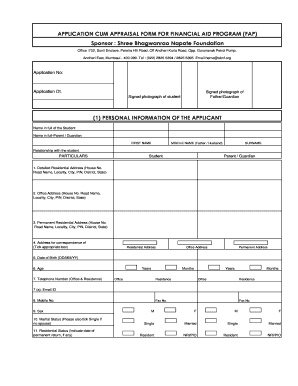
- Begin by pressing the ‘Get Form’ button to obtain the application form and open it for editing.
- Enter the application number and date at the top of the form. This information helps in processing your application efficiently.
- Provide signed photographs of both the student and their parent or guardian. Ensure these are recent and meet any specified requirements.
- Complete the personal information section by filling in the full names of the student and parent or guardian, including the first name, middle name (if applicable), and surname.
- Indicate the relationship between the applicant and the guardian in the designated field.
- Fill in detailed residential and office addresses, ensuring each component (house number, road name, locality, city, etc.) is accurately filled out.
- Select the appropriate box for the address that will be used for correspondence.
- Provide the student's date of birth and age, along with the telephone numbers for both office and residence.
- Indicate the email ID and mobile number for contact purposes.
- Select the appropriate sex and marital status. Remember to check 'Single' if there is no spouse.
- Indicate your residential status, noting any relevant dates of permanent return.
- For identification proof, specify the type of document and the corresponding identification numbers.
- Provide information about the number of dependents, along with their details.
- Complete the education or professional qualifications section for both the student and the parent or guardian.
- Indicate the financial information of the parent or guardian, including monthly gross salary and net salary.
- Fill out the employment details section, including employer name, department, designation, duration of employment, and retirement date.
- List information about any owned assets, including immovable property details and vehicle information.
- Complete the family information section, providing details for immediate family members including age, education, and profession.
- Ensure you have all required documents ready to submit, as listed in the documentation section.
- After verifying that all information is accurate, sign the declaration at the end, confirming the authenticity of your details.
- Finally, save your changes, and choose your preferred action to either download, print, or share the completed form.
Complete your application online today to access the financial aid assistance you need.
Industry-leading security and compliance
US Legal Forms protects your data by complying with industry-specific security standards.
-
In businnes since 199725+ years providing professional legal documents.
-
Accredited businessGuarantees that a business meets BBB accreditation standards in the US and Canada.
-
Secured by BraintreeValidated Level 1 PCI DSS compliant payment gateway that accepts most major credit and debit card brands from across the globe.