Get Ec Provincial Treasury Logis Supplier Registration Form
How it works
-

Open form follow the instructions
-

Easily sign the form with your finger
-

Send filled & signed form or save
How to fill out the EC Provincial Treasury LOGIS Supplier Registration Form online
Completing the EC Provincial Treasury LOGIS Supplier Registration Form online is an essential step for suppliers wishing to engage with government services. This guide provides clear, step-by-step instructions to ensure a smooth and successful registration process.
Follow the steps to complete your supplier registration form.
- Click ‘Get Form’ button to obtain the form and open it in the editor.
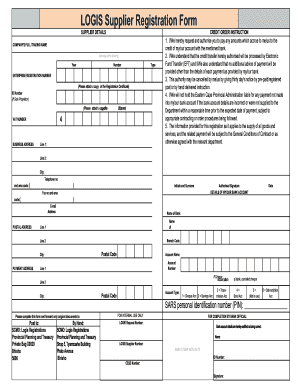
- Begin by entering the supplier details in the designated sections. Provide the company’s full trading name as it appears on official documents.
- Next, fill in the enterprise registration number. You must attach a copy of the registration certificate along with this form to verify your business.
- If you are a sole proprietor, please include your ID number and attach a copy of your ID for identification purposes.
- Provide the VAT number, as well as the business address, including street line 1, city, and postal code.
- In the credit order instruction section, authorize payments by filling in your bank account details accurately. This includes the account name, number, bank name, branch name, and branch code.
- Review and ensure the bank account type is correctly selected by marking one of the options provided.
- Sign and date the form where indicated. Your signature confirms your authorization for electronic fund transfers to the provided account.
- Ensure all necessary attachments, including a blank canceled cheque for the bank account details and any identity documents, have been included with your submission.
- After reviewing all information for accuracy, you can save changes, download a copy for your records, print the form, or share it as required.
Start completing your EC Provincial Treasury LOGIS Supplier Registration Form online today!
LOGIS, which stands for the Logistics Information System, is a government procurement system in South Africa. It helps manage the procurement and supply chain processes for public institutions. By registering using the EC Provincial Treasury LOGIS Supplier Registration Form, suppliers gain visibility into government contracts and opportunities, effectively connecting them with various procurement needs.