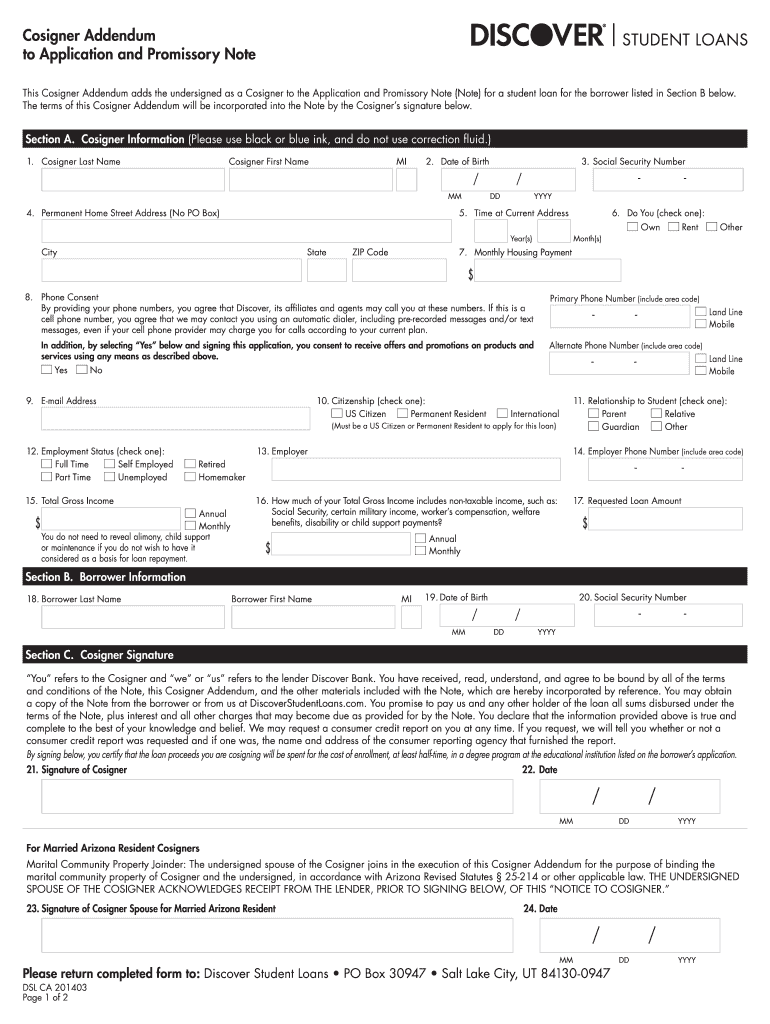
Re that the information provided above is true and complete to the best of your knowledge and belief. We may request a consumer credit report on you at any time. If you request, we will tell you whether or not a consumer credit report was requested and if one was, the name and address of the consumer reporting agency that furnished the report. By signing below, you certify that the loan proceeds you are cosigning will be spent for the cost of enrollment, at least half-time, in a degree program a.
Loading

Open form follow the instructions

Easily sign the form with your finger

Send filled & signed form or save
How to fill out the Discover DSL CA 201403 online
Filling out the Discover DSL CA 201403 form is an essential step for individuals acting as cosigners on a student loan. This guide provides detailed, step-by-step instructions to help users navigate the form with ease.
Follow the steps to complete the Discover DSL CA 201403 online.
- Click ‘Get Form’ button to obtain the form and open it in the editor.
- In Section A, provide the cosigner's information. Fill in the last name, first name, middle initial, date of birth, and social security number. Ensure that all details are accurate and clearly written in black or blue ink.
- Complete the permanent home address by entering the street address, city, state, and ZIP code. Do not use a P.O. Box.
- Indicate the duration of residence at your current address by specifying the number of years.
- Select whether you wish to receive promotional offers by checking 'Yes' or 'No'. If 'Yes', provide your phone number and included consent for communication.
- Choose your citizenship status by checking the appropriate box as either US Citizen or Permanent Resident.
- Select your employment status from the available options, such as Full Time, Part Time, Self Employed, Unemployed, Other, Retired, or Homemaker.
- Enter the total gross income by specifying the annual and monthly amounts. You are not required to disclose alimony, child support, or maintenance if you do not wish to.
- Provide the requested loan amount in the designated field.
- In Section B, fill in the borrower's information, including their last name, first name, date of birth, and social security number.
- In Section C, review the terms of the document and sign your name to certify that the provided information is accurate. Make sure to also date your signature.
- If applicable, a spouse's signature is required for married Arizona resident cosigners. Complete the additional signature and date fields.
- Once you have completed all sections, review the entire document for accuracy and clarity before finalizing.
- Save your changes to the form, and then proceed to download, print, or share the completed document as necessary.
Ensure a smooth process by completing the Discover DSL CA 201403 form online today.
Experience a faster way to fill out and sign forms on the web. Access the most extensive library of templates available.
Related content
by PJ Lipman · 2011 · Cited by 3 — Here, we have developed such a method to determine...
Our Doctor of Strategic Leadership (DSL) degree program with a concentration in Strategic...
Sep 19, 2016 — • If connecting to a DSL modem, make sure to have your DSL service...
Get answers to your most pressing questions about US Legal Forms API.
Is a Discover card worth having?
A Discover card can be worth having due to its excellent rewards program, including cashback on purchases. If you frequently shop at merchants that accept it, you can maximize your benefits. The features of the Discover DSL CA 201403 card can enhance your purchasing power while providing financial rewards.
What are the disadvantages of a Discover credit card?
Disadvantages of a Discover credit card include its limited acceptance compared to major networks like Visa and Mastercard. Also, users may encounter fewer promotional offers outside the U.S. Nevertheless, the Discover DSL CA 201403 card compensates with attractive cashback options and no hidden fees, making it worthwhile for many.
What is the downside to the Discover card?
One downside of the Discover card is that it may not be accepted everywhere, particularly in certain countries or smaller merchants. Additionally, some consumers find that its rewards structure may not align with their spending habits. However, the Discover DSL CA 201403 card has competitive benefits that can offset this issue for many users.
Is it better to get a Visa or Discover card?
Choosing between a Visa and a Discover card depends on your preferences and needs. Visa has wider acceptance globally, while Discover offers specific rewards and benefits that could align with your spending habits. Consider the features of the Discover DSL CA 201403 card, such as cashback offers, to determine which option best suits you.
How do you fill out a credit card application?
To fill out a credit card application, start by providing your personal information, such as your name, address, and social security number. Next, include details about your income and employment. Remember to review the terms and conditions associated with the Discover DSL CA 201403 card, as they may influence your decision.
How to find Discover card user ID?
To find your Discover card user ID, the most reliable method is to log in to your online account at the Discover website. If you forgot your user ID, you can use the 'Forgot User ID' option for assistance. Having easy access to your user ID is important for managing your account efficiently, and if you need additional help, US Legal Forms is here to assist you with all necessary documentation.
What is my credit card ID number?
Your credit card ID number, often referred to as the security code, is typically a three-digit number found on the back of the card. This number adds an extra layer of security for online purchases and transactions. Understanding your credit card ID helps in safeguarding your financial information, and using services like US Legal Forms can enhance your awareness regarding financial documentation.
Where is the ID number on a Discover card?
The ID number on a Discover card can usually be found on the back of the card. This number is typically located near the magnetic stripe and can be useful for various transactions. If you require further assistance in managing your Discover card, consider using tools available through US Legal Forms to streamline your financial organization.
What happened to Discover student loans?
Discover student loans are no longer available as the company has shifted its focus towards other financial products. This change means that existing borrowers can still manage their loans, but new applicants will need to explore different options. If you are looking for information or assistance regarding student loans, platforms like US Legal Forms can provide essential resources and guidance.
What is the tax document for Discover Savings?
The tax document for your Discover Savings account is typically a 1099-INT form. This form reports the interest earned on your account for the tax year. You will receive this document electronically or via mail, depending on your preferences. For further assistance, you can explore resources available on US Legal Forms to ensure you handle your tax documents correctly, especially related to Discover DSL CA 201403.
Use professional pre-built templates to fill in and sign documents online faster. Get access to thousands of forms.
If you believe that this page should be taken down, please follow our DMCA take down process here.