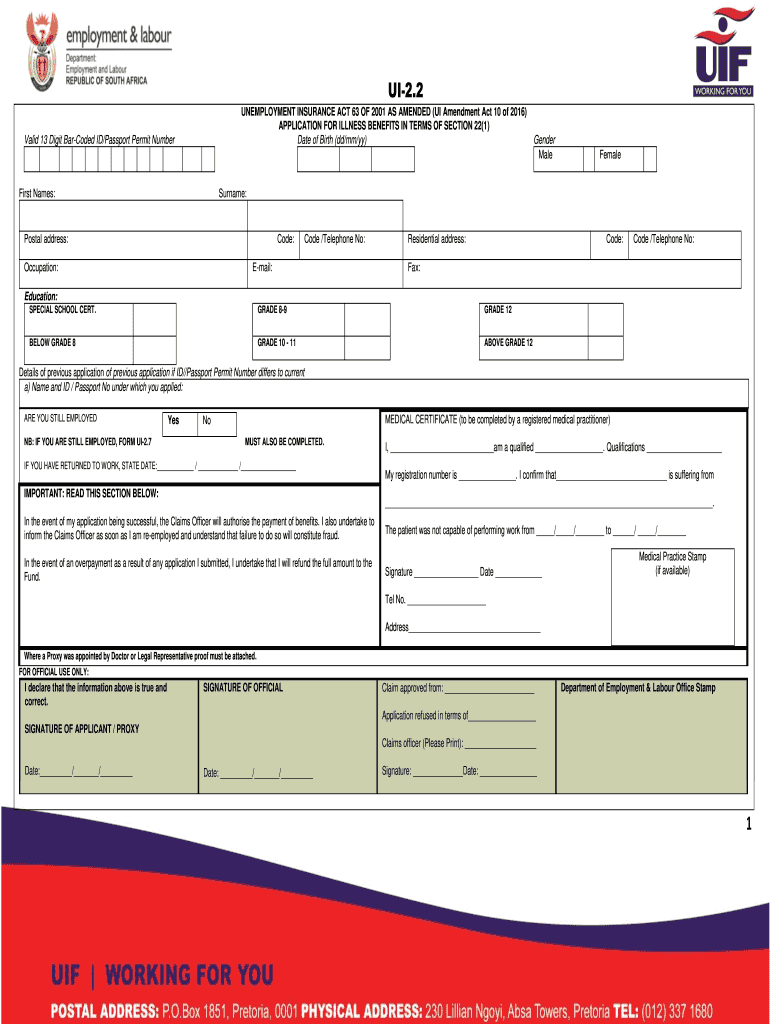
UI2.2 UNEMPLOYMENT INSURANCE ACT 63 OF 2001 AS AMENDED (UI Amendment Act 10 of 2016) APPLICATION FOR ILLNESS BENEFITS IN TERMS OF SECTION 22(1) Date of Birth (dd/mm/yy)Valid 13 Digit BarCoded ID/Passport.

Open form follow the instructions

Easily sign the form with your finger

Send filled & signed form or save
How to fill out the Form UI 2.2 - Applications For Illness Benefits online
Filling out the Form UI 2.2 online is a straightforward process that ensures you can apply for illness benefits efficiently. This guide will provide you with step-by-step instructions to help you navigate each section of the form with confidence.
Follow the steps to complete your application successfully.
- Press the 'Get Form' button to access the form and open it in your online editor.
- Enter your personal information, including your date of birth, valid identification number, first names, gender, surname, postal address, and contact details. Ensure that all information is accurate and up to date.
- Provide your occupation and its corresponding code, along with additional contact details such as telephone number and email address.
- Fill in your residential address and contact information, including any relevant fax number.
- In the 'Educational Background' section, select the highest level of education you have completed.
- If you have previously applied using a different identification number, provide the details requested about that previous application.
- Specify whether you are still employed. Remember, if you are still employed, you should fill out Form UI-2.7 instead.
- Complete the medical certificate section by having a registered medical practitioner confirm your illness. This includes entering the dates you were unable to work.
- Provide your signature and the date at the end of the application. If applicable, ensure that the medical practice stamp is included.
- Once all sections are filled out completely, you can choose to save changes, download, print, or share the form as needed.
Start your application process online by using the Form UI 2.2 now.
Experience a faster way to fill out and sign forms on the web. Access the most extensive library of templates available.
Related content
Effective immediately, paper Form UC-1 is not accepted. ... Employers are required to...
The ITSC wishes to acknowledge the National Unemployment Insurance (UI) ... Prepare...
Jun 30, 2016 — The case service record documents the application for and/or provision of...
Get answers to your most pressing questions about US Legal Forms API.
What is a UI 2.7 form?
UI.2.7. UNEMPLOYMENT INSURANCE FUND. REMUNERATION RECEIVED BY THE EMPLOYEE WHILST STILL IN EMPLOYMENT.
Under what circumstances can you claim UIF in South Africa?
When your employer terminates your service, you can apply to the Unemployment Insurance Fund (UIF) for benefits. The benefits are only available to you if you have been contributing to the UIF while you worked. You cannot claim if you have resigned, been suspended or absconded from work.
Can you claim UIF if you retire in South Africa?
You can claim retirement benefits if you have retired from employment and will not be seeking further employment. You can not claim if you have taken early retirement. You can claim retirement benefits through us if you are a South African national and have a barcoded ID book.
How do I claim UIF for illness in South Africa?
You can apply for illness benefits at your nearest labour centre if you are an employed contributor to the Unemployment Insurance Fund (UIF) and unable to work because of illness. To qualify for the benefits, you must be receiving less than your normal wages while you are on sick leave.
Can I claim UIF online in South Africa?
uFiling is a secure Online system introduced to Employers to register, declare and pay UIF contributions. Employees can also use the system to apply for benefits such as unemployment, maternity and illness.
How to check if you are registered for UIF online South Africa?
How to check if your UIF has been approved Log on to the UFiling portal by visiting ufiling.labour.gov.za or .ufiling.co.za. Select “Check My Status” by clicking on it. Input the necessary information as prompted in the next window and complete the required verification processes.
Use professional pre-built templates to fill in and sign documents online faster. Get access to thousands of forms.
If you believe that this page should be taken down, please follow our DMCA take down process here.