Loading
Get Patient First Or Print Name Of Provider To Release My
How it works
-

Open form follow the instructions
-

Easily sign the form with your finger
-

Send filled & signed form or save
How to use or fill out the Patient First Or Print Name Of Provider To Release My online
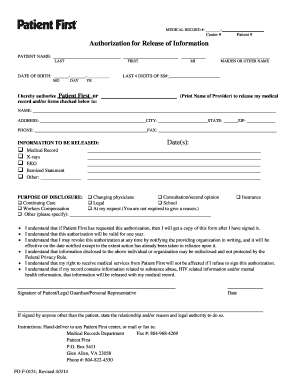
Filling out the Patient First Or Print Name Of Provider To Release My form is a crucial step in managing your medical records. This guide provides clear and detailed instructions to help you complete the form smoothly and efficiently online.
Follow the steps to accurately complete your release form online.
- Press the ‘Get Form’ button to acquire the form and open it in your preferred online editor.
- Enter the patient's first and last name in the designated fields. Be sure to include any maiden or other names if applicable.
- Fill in the patient's date of birth, using the format of month, day, year, and include the middle initial if available.
- Provide the last four digits of the patient's social security number.
- Complete the section for the provider or organization authorized to release the medical information by printing their name and contact details, including address, city, state, zip code, and phone number.
- Select the medical information you wish to be released by checking the appropriate boxes—medical record, X-rays, EKG, itemized statement, or other.
- Indicate the purpose of the disclosure by checking the relevant options, including continuing care, consultation, legal reasons, or other specified purposes.
- Read and acknowledge the consent statements regarding the understanding of the authorization's validity and data handling.
- If applicable, provide the signature of the patient, legal guardian, or personal representative, and state the relationship or authority if someone other than the patient is signing.
- Once the form is fully filled, you can save your changes, download it, print it, or share it as necessary.
Complete your forms online to ensure your medical information is released accurately and promptly.
Patient information. Whose health records do you want? ... Clinic, hospital, care provider. Who has the information you want? ... Date of Services. Who has the information you want? ... Information to be released. ... Receiving party or destination of records. ... Purpose of release. ... Expiration date or duration of consent. ... Release instructions.
Industry-leading security and compliance
US Legal Forms protects your data by complying with industry-specific security standards.
-
In businnes since 199725+ years providing professional legal documents.
-
Accredited businessGuarantees that a business meets BBB accreditation standards in the US and Canada.
-
Secured by BraintreeValidated Level 1 PCI DSS compliant payment gateway that accepts most major credit and debit card brands from across the globe.