Loading
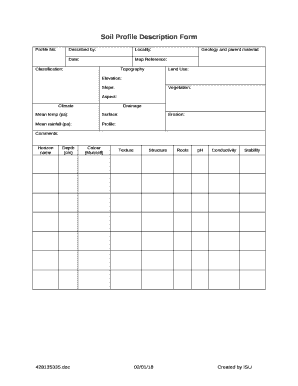
Get Soil Profile Description Form
How it works
-

Open form follow the instructions
-

Easily sign the form with your finger
-

Send filled & signed form or save
How to fill out the Soil Profile Description Form online
Filling out the Soil Profile Description Form online can help you create a detailed record of soil characteristics and conditions. This guide will walk you through each section and field of the form to ensure accurate data entry.
Follow the steps to complete the Soil Profile Description Form successfully.
- Click ‘Get Form’ button to access the Soil Profile Description Form and open it in the editor.
- Begin by entering the 'Profile No' in the designated field to uniquely identify your soil profile.
- In the 'Described by' section, write your name or the name of the person who conducted the soil description.
- Provide the 'Locality' where the soil sample was taken to help define the geographic context.
- Enter the 'Date' when the soil profile was described to record the documentation timeline.
- Indicate the 'Map Reference' for precise location data related to your soil profile.
- Fill in the 'Classification' field to categorize the soil according to recognized standards or systems.
- Describe the 'Topography' of the area where the soil is located, noting any relevant landscape features.
- In the 'Geology and parent material' section, explain the underlying geological materials and influences.
- Record the 'Land Use' to indicate how the land is being utilized (e.g., agricultural, urban, etc.).
- Provide the 'Elevation' of the site above sea level, as it impacts soil characteristics.
- Detail the 'Slope' characteristics that can influence drainage and soil erosion.
- In the 'Vegetation' section, list the types of plants found in the area, as they relate to soil properties.
- Specify the 'Aspect', indicating the direction the land faces, which can impact climate conditions.
- In the 'Climate' field, describe the prevailing climate conditions affecting the site.
- Provide details about the 'Drainage' characteristics of the soil, noting its drainage capabilities.
- Enter the 'Mean temp (pa)' to record the average temperature of the area.
- In 'Surface', describe the top layer of soil in terms of condition and composition.
- Record the 'Mean rainfall (pa)' for average precipitation information.
- Fill out the 'Profile' section by describing the layers or horizons of the soil.
- Note any 'Erosion' that has occurred, if applicable, to help assess soil stability.
- In the 'Comments' section, provide any additional comments or observations that may be relevant.
- Finally, save your changes, and utilize options to download, print, or share the completed form as needed.
Complete your Soil Profile Description Form online today to accurately document important soil information.
Soils are named and classified based on their horizons. The soil profile has four distinct layers: 1) O horizon; 2) A horizon; 3) B horizon, or subsoil; and 4) C horizon, or soil base (Figure 31.2. 2). The O horizon has freshly decomposing organic matter—humus—at its surface, with decomposed vegetation at its base.