Loading
Get Self-employment Income (sei) Form
This website is not affiliated with any governmental entity
How it works
-

Open form follow the instructions
-

Easily sign the form with your finger
-

Send filled & signed form or save
How to fill out the Self-Employment Income (SEI) Form online
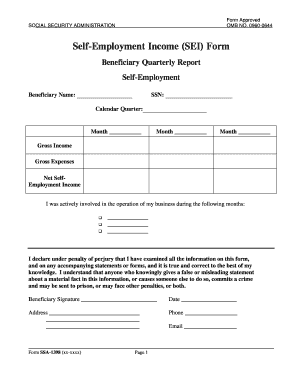
The Self-Employment Income (SEI) Form is essential for reporting income generated through self-employment to the Social Security Administration. This guide provides a clear and supportive approach to completing the form online, ensuring users understand each component and requirement.
Follow the steps to successfully complete the SEI form online.
- Click 'Get Form' button to access and open the Self-Employment Income (SEI) Form in your preferred online document editor.
- Begin by entering your beneficiary name in the designated field. This should be the name that matches the Social Security records.
- In the 'Gross Income' section, enter the total income generated from your self-employment activities during the reported months. Accurately reflect all earnings.
- Indicate your active involvement in the business during the listed months by marking the relevant checkboxes.
- Sign and date the form at the bottom. This declaration confirms that all information provided is true and accurate to the best of your knowledge.
- Finally, include your address, phone number, and email in the corresponding fields. Once completed, you can save changes, download, print, or share the form as needed.
Complete your Self-Employment Income (SEI) Form online today to ensure accurate reporting and timely processing.
Related links form
– Ration card, license, Voter's ID, or other Identity Proof. – Parents' income certificate, income tax return, Form 16 by the employer, Salary certificate, etc as proof of income. – Affidavit that states particulars stated in the application are true.