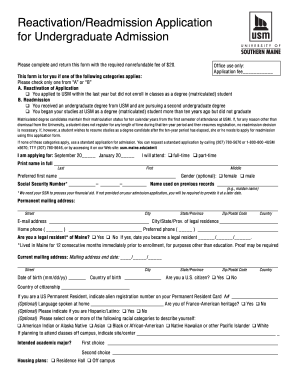
Get Usm Reactivation/readmission Application For Undergraduate Admission
How it works
-

Open form follow the instructions
-

Easily sign the form with your finger
-

Send filled & signed form or save
How to fill out the USM Reactivation/Readmission Application for Undergraduate Admission online
Completing the USM Reactivation/Readmission Application for Undergraduate Admission is an important step for users seeking to resume their educational journey. This guide provides a clear and supportive walkthrough to ensure you can fill out the application smoothly and accurately.
Follow the steps to successfully complete your application
- Click ‘Get Form’ button to obtain the application form and open it in the online editor.
- Determine your application type by checking either 'A' for reactivation or 'B' for readmission. Select the category that applies to your situation.
- Indicate the semester for which you are applying by filling in either September or January, followed by the corresponding year.
- Select your attendance status by choosing either full-time or part-time.
- Fill in your full name, including last name, first name, and preferred first name as applicable.
- Optionally provide your gender, social security number, and name used on previous records.
- Complete your permanent mailing address, email address, home phone number, and preferred phone number.
- Indicate your legal residency status in Maine and provide the date you became a legal resident, if applicable.
- Provide your current mailing address and the date it will end, if it differs from your permanent address.
- Enter your date of birth, country of birth, and citizenship status.
- If you have attended high school or postgraduate schools, complete the section with the necessary details.
- List all colleges or post-secondary institutions you have attended, ensuring to follow the order of enrollment with the most recent first.
- Disclose any disciplinary violations or convictions, if applicable, and provide a separate sheet of paper for explanation.
- Attach a personal statement detailing your reason for seeking reactivation or readmission, along with any relevant resume or activity documentation.
- Sign and date your application to certify that the information provided is complete and accurate.
- Once all sections are filled out, save changes to your application. You can download, print, or share the completed form as needed.
Complete your application online today to take the next step in your academic journey.
To get readmitted to college, you will typically need to fill out a USM Reactivation/Readmission Application for Undergraduate Admission. This application helps the admissions committee assess your previous academic performance and your current readiness to return. Additionally, you may need to provide any updated transcripts or other documents that showcase your engagement since your last enrollment. Completing this process can enable you to successfully rejoin the college community.