Loading
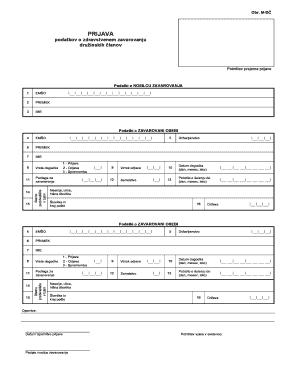
Get Prijava Podatkov O Zdravstvenem Zavarovanju Druinskih Lanov
How it works
-

Open form follow the instructions
-

Easily sign the form with your finger
-

Send filled & signed form or save
How to fill out the PRIJAVA Podatkov O Zdravstvenem Zavarovanju Druinskih Lanov online
This guide provides a step-by-step approach to filling out the PRIJAVA Podatkov O Zdravstvenem Zavarovanju Druinskih Lanov form online. It is designed to assist users in providing accurate information for health insurance coverage for family members.
Follow the steps to successfully complete your application.
- Click 'Get Form' button to obtain the form and open it in your editor.
- In the section for 'Podatki o NOSILCU ZAVAROVANJA', fill in the following fields: EMŠO (personal identification number), PRIIMEK (surname), and IME (first name). Ensure that all information is accurate and complete.
- Next, complete the 'Podatki o ZAVAROVANI OSEBI' section. Enter the EMŠO, PRIIMEK, IME, and select the 'Vrsta dogodka' (type of event) from the options provided: 1 - Prijava (registration), 2 - Odjava (cancellation), or 3 - Sprememba (change).
- Indicate the 'Podlaga za zavarovanje' (basis for insurance), and complete details about the person's citizenship and their date of the event (day, month, year).
- In the provided fields for location, enter 'Naselje, ulica, hišna številka' (settlement, street, house number) as well as the postal code and the country.
- If applicable, provide details such as 'Vzrok odjave' (reason for cancellation) and any educational notes, including the 'Potrdilo o šolanju do' (certificate of schooling until).
- Finally, review all entered data for accuracy before completing the form. Once satisfied, you can save changes, download, print, or share the filled form.
Start completing your application for the PRIJAVA Podatkov O Zdravstvenem Zavarovanju Druinskih Lanov online today.