Loading
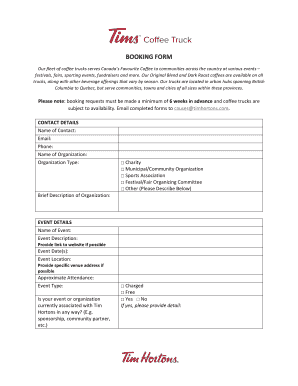
Get Tims Coffee Truck - Booking Form - Tim Horton
How it works
-

Open form follow the instructions
-

Easily sign the form with your finger
-

Send filled & signed form or save
How to fill out the Tims Coffee Truck - Booking Form - Tim Horton online
This guide provides a detailed walkthrough for completing the Tims Coffee Truck - Booking Form - Tim Horton online. Following these instructions will help ensure that your booking request is submitted correctly and efficiently.
Follow the steps to complete the booking form accurately.
- Click ‘Get Form’ button to access the booking form and open it for editing.
- Begin with the contact details section. Provide your name, email, and phone number where indicated.
- In the next field, fill in the name of your organization. This is the entity representing the booking.
- Specify the organization type by selecting one of the categories provided: Charity, Municipal/Community Organization, Sports Association, Festival/Fair Organizing Committee, or Other. If you select 'Other,' provide a brief description.
- Continue with the brief description of your organization. This information helps clarify the purpose and function of the entity making the booking.
- Move to the event details section. Enter the name of the event in the designated field.
- In the event description section, provide a detailed explanation of the event's purpose and activities.
- Indicate the event date(s) when the coffee truck service is needed.
- Fill in the event location, including specific venue details if available.
- If applicable, provide a link to the event's website for additional information.
- Estimate the expected attendance at the event by entering a number in the approximate attendance field.
- Specify the event type by selecting either Charged or Free. If it is Charged, provide details as requested.
- Finally, indicate if your event or organization is currently associated with Tim Hortons in any capacity by answering the relevant question.
- Once you have completed all fields, review the information for accuracy. Afterward, save your changes, download, print, or share the form as needed.
Start your booking process by completing the Tims Coffee Truck - Booking Form online today!
Take 12 costs CAN$ 23.39 which is less than the total if you're to purchase them as 12 individual drinks.