Loading
Get Wrestling Registration Form
How it works
-

Open form follow the instructions
-

Easily sign the form with your finger
-

Send filled & signed form or save
How to fill out the Wrestling Registration Form online
Filling out the Wrestling Registration Form online can be a straightforward process. This guide will provide you with detailed steps to ensure that all necessary information is correctly completed.
Follow the steps to fill out the Wrestling Registration Form online
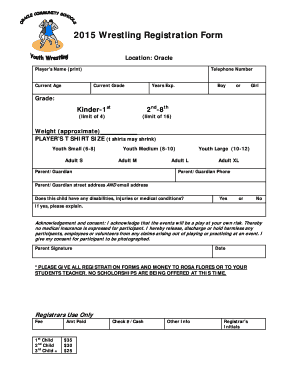
- Click ‘Get Form’ button to obtain the form and open it in the editor.
- Begin by entering the player's name in the appropriate field. Ensure it is printed clearly as this will be used for identification.
- Next, input the current age of the player. This information helps in categorizing the participant appropriately.
- Provide a telephone number where you can be reached. This is important for emergency contact and communication purposes.
- Indicate the current grade of the player. Options typically include categories by academic grade.
- Detail the years of experience the player has in wrestling to help determine their skill level.
- Select the player's gender by indicating either 'Boy' or 'Girl.'
- Specify the approximate weight of the player, as this may affect their competition category.
- Choose the player's desired t-shirt size from the provided options. Note that shirts may shrink after washing.
- Enter the parent's or guardian's details, including their name, phone number, street address, and email address for further communication.
- Indicate whether the player has any disabilities, injuries, or medical conditions and provide an explanation if 'Yes' is selected.
- Read and acknowledge the consent and release statement. Sign and date the form to confirm agreement.
- Once all information is filled out, save the changes, and you may choose to download, print, or share the completed form as required.
Complete your Wrestling Registration Form online today!
Related links form
A registration form is a document with a set of fields that a person fills out and sends to a business or individual to register for an event, program, membership, list, and so on.