Loading
Get Application For Employment - Dcmh - Dcmhsd
How it works
-

Open form follow the instructions
-

Easily sign the form with your finger
-

Send filled & signed form or save
How to fill out the APPLICATION FOR EMPLOYMENT - DCMH - Dcmhsd online
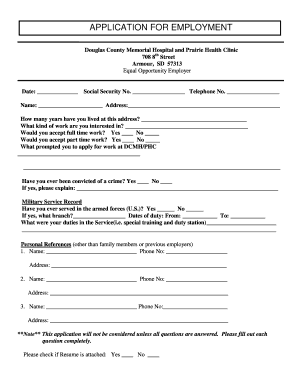
Completing the APPLICATION FOR EMPLOYMENT - DCMH - Dcmhsd online can streamline your job application process. This guide provides clear, step-by-step instructions on filling out the form, ensuring that you provide all necessary information accurately and efficiently.
Follow the steps to fill out the application form online.
- Click ‘Get Form’ button to access the application form and open it in the editor.
- Enter the date in the designated field at the top of the form. Ensure this is the date you are submitting your application.
- Provide your social security number and telephone number in the appropriate sections. This information is crucial for identification purposes.
- Fill out your name and address under the personal information section. Be sure to provide an accurate and complete address.
- Indicate how many years you have lived at the current address. This section helps to establish your residency history.
- Specify the type of work you are interested in, and indicate whether you would accept full-time or part-time work by marking the appropriate boxes.
- Share what prompted you to apply for work at Douglas County Memorial Hospital or Prairie Health Clinic. This section allows you to express your motivation.
- Answer the question regarding any past criminal convictions truthfully. If applicable, provide details in the space provided.
- Complete the military service record section if you have served in the U.S. armed forces. Include the branch of service, dates of duty, and a brief description of your duties.
- List personal references, excluding family members or previous employers, and provide their contact information.
- Indicate whether a resume is attached by marking the appropriate box.
- Fill out the education section by providing the name and address of schools attended, the years completed, and any degrees earned.
- Complete the previous employers section with details of up to three past employment experiences, including company names, phone numbers, addresses, employment dates, positions, last rates of pay, and reasons for leaving.
- Read the acknowledgment statement regarding truthfulness and sign the application. Ensure to date your signature.
- Save your changes, download, print, or share the completed application form as needed.
Take the next step in your career by completing your application online today!