For businesses on the move, setting up or changing your Duke Energy service isquick and easy with our online tools and instructions.

How it works
  • Open form

    Open form follow the instructions

  • Easily sign form

    Easily sign the form with your finger

  • Share form

    Send filled & signed form or save

How to fill out the Non-residential Service Request Form - Duke Energy online

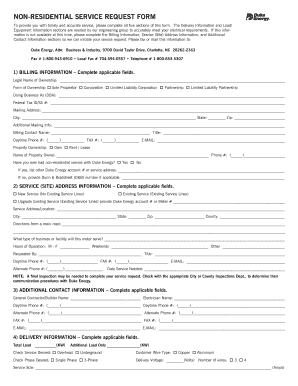
This guide offers comprehensive instructions for completing the Non-residential Service Request Form for Duke Energy online. By following these steps, you will ensure your request is processed promptly and accurately.

Follow the steps to complete your Non-residential Service Request Form.

  1. Click ‘Get Form’ button to obtain the form and open it in an editor.
  2. Begin with the billing information section. Complete all applicable fields, including legal ownership details, mailing address, and contact name. Ensure that the federal tax ID or social security number is accurate.
  3. Proceed to the service (site) address information section. Indicate whether you are applying for new service, existing service, or upgrading existing service. Provide the complete service address along with operational hours and requested contact information.
  4. Fill out the additional contact information. Enter the names and contact details for key personnel such as the contractor and electrician overseeing the project.
  5. Complete the delivery information section. Specify the total load and additional load requirements, check the desired service type (overhead or underground), and provide specifications on the customer wire type and phase.
  6. In the load/equipment information section, detail the various types of equipment. Provide quantities, kilowatt usage, and any additional notes, especially for specialized equipment like motors or food service appliances.
  7. Review all entered information for accuracy. Make any necessary corrections. When satisfied, save your changes, download the form, print it if needed, or share it according to your organizational procedures.

Start filling out your Non-residential Service Request Form online to ensure timely service!

Get form

Experience a faster way to fill out and sign forms on the web. Access the most extensive library of templates available.

Related content

Duke Energy Carolinas - SEC.gov

Industrial, commercial and residential growth or decline in service ... A request to place...

Learn more
Manage My Account - Residential Customers - Duke...

Quickly access and manage your account online. Sign in to view your bill, choose your...

Learn more
Talk:Duke Energy - GEM.wiki

Jun 26, 2017 — Duke Energy's service territory covers 47,000 square miles with 106,000...

Learn more
Questions & Answers

Get answers to your most pressing questions about US Legal Forms API.

Contact support

How do I talk to a real person at Duke Energy?

Get In Touch Emailservice@businessdei.shopdukeenergystore.com. Ideal for checking order status & product questions. ... Call844.788.0157. Ideal for checking order status & product questions. ... Call800.774.1202. Ideal for general billing and Duke Energy account management information.

Yes. All payments are applied immediately and will stop orders to disconnect your service.

The Customer of Record must have their Social Security number or other Personally Identifying Information on file to add an Authorized Person. The Authorized Person will be asked to verify the Customer of Record's Social Security number or other Personally Identifying Information each time they contact Duke Energy.

How to cancel Duke Energy Call customer service on 800-777-9898. Ask to speak with a representative. Provide them with your account number and customer details. Request cancellation of your recurring payments. You will receive a confirmation letter or email.

How do I submit a claim? To submit a claim, you must complete our Surge Coverage and Grounding Claim form. For additional questions, please call 888.999. 8856.

Navigate to My Profile in the upper right corner. Select Add Account. Select the type of account that you would like to add. Provide information to help locate your account, like account number or social security number.

How to cancel Duke Energy Call customer service on 800-777-9898. Ask to speak with a representative. Provide them with your account number and customer details. Request cancellation of your recurring payments. You will receive a confirmation letter or email.

Get This Form Now!

Use professional pre-built templates to fill in and sign documents online faster. Get access to thousands of forms.

If you believe that this page should be taken down, please follow our DMCA take down process here.

Get Non-residential Service Request Form - Duke Energy