Loading
Get Gazprom Cot
How it works
-

Open form follow the instructions
-

Easily sign the form with your finger
-

Send filled & signed form or save
How to fill out the Gazprom Cot online
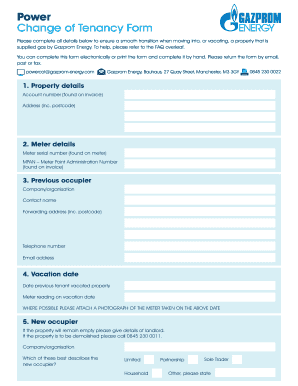
Filling out the Gazprom Cot form is an essential step for users transitioning into or out of properties supplied by Gazprom Energy. This guide provides clear, step-by-step instructions to help you complete the form accurately and efficiently.
Follow the steps to complete the Gazprom Cot form effectively.
- Click ‘Get Form’ button to obtain the form and open it for editing.
- Begin by entering the property details, which include the account number and the property address with the postcode. Ensure that the information matches the details on your invoice.
- Next, provide the meter details. Include the meter serial number found on the meter, as well as the MPAN — Meter Point Administration Number — which can be located on your invoice.
- For the previous occupier section, list the company or organization, the contact person's name, a forwarding address, and their telephone number and email address.
- Indicate the vacation date by entering the date when the previous tenant vacated the property and the meter reading taken on that date. If possible, attach a photograph of the meter taken on the same date.
- In the new occupier section, if the property will remain empty, provide details about the landlord. If the property is to be demolished, contact Gazprom Energy at 0845 230 0011 for further instructions.
- Provide details about the new occupier, including their company or organization name. Select the appropriate description for the new occupier from the options provided: limited, household, partnership, sole trader, or other.
- Complete the fields for the new occupier, which include the registration number (if applicable), contact name, billing address, telephone number, and email address. You may select 'Same as section 1' if applicable.
- In the 'Your details' section, fill in your name and the date of completion to verify the form.
- Finally, review all the information provided for accuracy, save changes to the completed document, download or print it, and prepare to submit the form via email, post, or fax to the designated contact.
Complete your Gazprom Cot form online today for a seamless transition!
Gazprom Marketing & Trading Retail Ltd which traded as Gazprom Energy, is now called SEFE Energy Ltd.