Loading
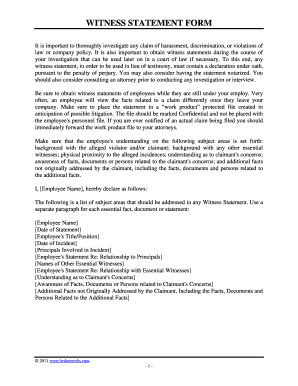
Get Sample Witness Statement Form
How it works
-

Open form follow the instructions
-

Easily sign the form with your finger
-

Send filled & signed form or save
How to fill out the Sample Witness Statement Form online
Filling out the Sample Witness Statement Form online is an essential process in documenting witness accounts for investigations. This guide provides clear, step-by-step instructions to help users navigate each section of the form effectively.
Follow the steps to complete the Sample Witness Statement Form online.
- Click 'Get Form' button to obtain the form and open it in the editor.
- Begin by entering the employee's name in the designated field marked '[Employee Name]'. This identifies the individual providing the witness statement.
- Next, fill in the '[Date of Statement]' field with the current date when the statement is being completed.
- Provide the employee's title or position in the '[Employee's Title/Position]' field. This details the witness's role within the organization.
- Input the '[Date of Incident]', indicating when the incident in question occurred.
- List the '[Principals Involved in Incident]', which includes the names of individuals directly involved in the incident being witnessed.
- In the '[Employee's Statement Re: Relationship to Principals]' section, describe the witness's relationship to the involved principals to provide context.
- Include the names of '[Other Essential Witnesses]' who may provide additional information about the incident.
- In the '[Employee's Statement Re: Relationship with Essential Witnesses]' field, explain the connectedness or relationship of the witness to these individuals.
- Address the '[Understanding as to Claimant's Concerns]' by stating the witness's insights regarding the claimant's issues.
- Detail the '[Awareness of Facts, Documents or Persons related to Claimant's Concerns]' to outline relevant documents or individuals that can support the statement.
- Finally, include '[Additional Facts not Originally Addressed by the Claimant, Including the Facts, Documents and Persons Related to the Additional Facts]' to ensure comprehensive coverage of all pertinent information.
- At the end of the form, confirm that the statement is confidential and should not be shared without proper authorization. Then, complete the statement with the declaration under penalty of perjury, adding the '[City]', '[County]', and '[State]' where it is executed.
- For optional notarization, provide the signature of the declarant in the '[Signature of Declarant]' field and proceed to save changes, download, print, or share the filled form as necessary.
Complete your witness statement forms online today for a streamlined documentation process.
Preparing a witness statement your name, address, occupation and telephone number. the evidence to be given set out in a logical order. labelled attachments if you refer to documents in your statement. the date and your signature.