Loading
Get Farmlab Submission Form
How it works
-

Open form follow the instructions
-

Easily sign the form with your finger
-

Send filled & signed form or save
How to fill out the Farmlab Submission Form online
Filling out the Farmlab Submission Form online is a straightforward process that ensures your diagnostic samples are submitted accurately. This guide will provide clear, step-by-step instructions for each section of the form, making it accessible for all users.
Follow the steps to successfully complete your submission.
- Press the ‘Get Form’ button to access the Farmlab Submission Form and open it in your preferred editor.
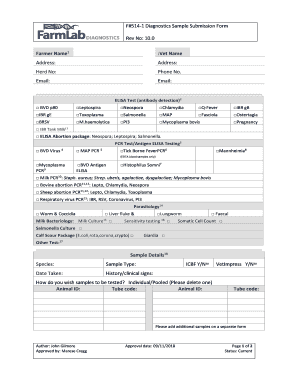
- Begin by entering the farmer's name in the designated field. Ensure that this is the name of the individual submitting the form.
- In the next set of fields, provide the veterinarian's name and the contact details, including the address, phone number, and email. Make sure to double-check the accuracy of the information.
- Input the herd number that corresponds to the diagnostic samples you are submitting. This is crucial for tracking and identifying your samples.
- Choose the appropriate tests from the ELISA Test and PCR Test sections. Use checkboxes to indicate which specific tests you are requesting for your samples.
- In the Sample Details section, specify the species and sample type. Additionally, provide the date the sample was taken and include any relevant history or clinical signs.
- Indicate whether you wish to test the samples individually or pooled by deleting the option that does not apply. Complete the Animal ID and Tube Code fields accordingly.
- If you have additional samples, include them on a separate form as instructed.
- Before submission, review the FarmLab Diagnostics Terms and Conditions and the sample packaging instructions available online. This is essential for ensuring compliance with submission requirements.
- Submit the completed form. You can save changes, download a copy for your records, print it out, or share it electronically as needed.
Start submitting your diagnostic samples online today for efficient processing and accurate results.