Loading
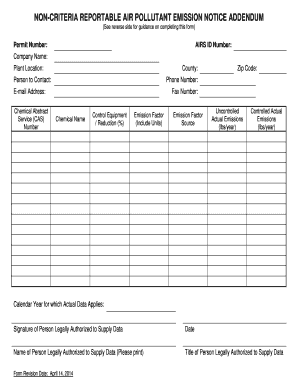
Get Addendum For Non-criteria Reportable Pollutants - Colorado
How it works
-

Open form follow the instructions
-

Easily sign the form with your finger
-

Send filled & signed form or save
How to fill out the Addendum For Non-Criteria Reportable Pollutants - Colorado online
Completing the Addendum For Non-Criteria Reportable Pollutants in Colorado is essential for reporting emission data. This guide provides step-by-step instructions to help users fill out the form accurately and efficiently.
Follow the steps to complete the form successfully.
- Press the ‘Get Form’ button to access the Addendum For Non-Criteria Reportable Pollutants and open it in the editor.
- Fill in the permit number. For new permit applications, leave this field blank. If modifying an existing permit, enter the previously assigned permit number.
- Enter the AIRS ID number. For new Air Pollutant Emission Notice (APEN) applications, this should be left blank. If modifying an existing APEN or permit, provide the assigned AIRS ID number.
- Input the company name and plant location. Ensure the information is accurate and reflects the official registered names.
- Complete the contact information fields, including county, person to contact, phone number, e-mail address, and fax number.
- List the Chemical Abstract Service (CAS) number and chemical name for each non-criteria air pollutant emitted from the point. Reference the appropriate regulation or Safety Data Sheet for accuracy.
- Indicate the type of control equipment used and the percentage reduction achieved by this equipment in the respective fields.
- If applicable, enter the emission factor and its source, which may include recognized standards or manufacturer details.
- Provide the uncontrolled actual emissions in pounds per year. This should reflect emissions excluding any reductions from control equipment.
- If emissions are controlled, fill in the controlled actual emissions in pounds per year, including the reductions noted earlier. If emissions are uncontrolled, denote as 'N/A'.
- Specify the calendar year for which the actual data applies.
- Sign the form at the designated line, providing the name and title of the person legally authorized to submit the data.
- Finally, review the completed form for accuracy. Save changes, download, print, or share the form as necessary.
Start filling out your documents online to ensure compliance and accurate emissions reporting.
An APEN is an Air Pollutant Emission Notice, and is used to: Report your emissions. Apply for a permit.
Industry-leading security and compliance
US Legal Forms protects your data by complying with industry-specific security standards.
-
In businnes since 199725+ years providing professional legal documents.
-
Accredited businessGuarantees that a business meets BBB accreditation standards in the US and Canada.
-
Secured by BraintreeValidated Level 1 PCI DSS compliant payment gateway that accepts most major credit and debit card brands from across the globe.